
If you’re building a modern WordPress site- whether it’s a blog, online course, membership platform, or niche media brand- engaging your audience is no longer optional.
It’s how you stay visible, relevant, and growing in 2025 and beyond.
And while comments, shares, and likes are helpful, polls offer something deeper: insight, feedback, and conversation starters you can actually build on.
That’s where Pollify comes in.
Built from the ground up as a 100% block-based WordPress poll plugin, Pollify makes it easier than ever to create engaging polls and feedback blocks directly inside the Gutenberg editor- without any shortcodes, forms, or clunky embeds.
In this series, we’ll explore why polls still work in a fast-scrolling digital world, what Pollify offers, and why it might be the best alternative to legacy plugins like Crowdsignal. But before diving into features, let’s first explore why polls matter at all.
Why Polls Work Even Better in AI Age
User engagement has changed a lot over the last few years. With AI-generated content everywhere and attention spans shrinking, websites need more than just great articles or products. They need interaction. They need feedback. And they need it fast.
Polls are one of the simplest yet most effective ways to create that two-way communication. They invite participation and provide value at the same time. A well-placed poll on your homepage, blog, or product page can:
- Spark engagement: Quick reactions encourage visitors to participate without hesitation.
- Gather insights: Understand what your audience wants or thinks.
- Increase session time: Visitors are more likely to stay and interact when they feel involved.
- Support conversion decisions: Showcase what others are voting for, helping new users decide.
Unlike long surveys or feedback forms, a poll takes seconds to answer — but the results can influence your entire content or product strategy.
WordPress Poll Plugin: Where Traditional Poll Plugins Fall Short
Despite the demand, many of the WordPress poll plugins in the space haven’t aged well. Most are built on outdated shortcode systems, require external dashboards, or don’t play nicely with Gutenberg.
One of the most widely used tools, Crowdsignal (formerly Polldaddy), has powerful features but a number of limitations:
- It relies on an external interface disconnected from your WordPress workflow.
- Custom styling is limited unless you’re on a higher-tier plan.
- Even basic features like poll embedding or branding removal are locked behind the $180/year Pro plan.
- It doesn’t feel native inside the Gutenberg editor.
And that’s frustrating. Especially when you want to quickly drop a poll into your blog post or landing page without jumping between tabs, copying embed codes, or dealing with shortcode issues.
It was clear that the WordPress ecosystem needed a modern, intuitive, block-based polling solution.
Introducing Pollify: WordPress Poll Plugin Made for the Block Era
Pollify is a Gutenberg-native poll builder plugin designed for modern WordPress creators. It lets you create beautiful, interactive polls directly inside the WordPress editor — no coding, no shortcodes, and no unnecessary interfaces.
What sets it apart is its simplicity. Pollify integrates into your content flow like any other block. You can drag it into posts, pages, WooCommerce product descriptions, course lessons, or even custom layouts built with block themes.
Full Block Editor Integration
Pollify was built specifically for the block editor. This means you get the most seamless editing experience — no shortcodes, no external builder, and no guesswork. What you see is truly what you get.
You can position polls anywhere in your content and customize them on the fly. Layouts, responses, visibility, and voting logic are all editable from the block sidebar.
Unlimited Polls and Voting
One of the biggest advantages of Pollify is that even the free version lets you create unlimited polls and collect unlimited votes. There are no artificial restrictions on how many responses you can get or how many times you can use the block.
This makes it ideal for:
- Bloggers running weekly reader polls
- Educators collecting in-course feedback
- Media brands conducting regular opinion polls
You’re not penalized for growing your audience.
Flexible Display Options
Pollify supports both horizontal and vertical layouts, allowing you to present options in the most reader-friendly format. Whether you’re adding a quick vote at the end of a post or integrating a multi-option poll mid-page, you can adjust everything from alignment to spacing.
This ensures your polls feel native and match your brand design — whether you’re using Astra, Kadence, or any block-based theme.
Real-time Results and Analytics
Pollify includes built-in analytics so you can see how people are voting, even with the free version. You can display live results, toggle results visibility, and track feedback over time.
Whether you’re collecting opinions on a new feature or gauging community sentiment, the insights are always a click away.
Lightweight and Performance-Friendly
Pollify doesn’t add unnecessary weight to your pages. It’s optimized for performance and avoids the bloat common in shortcode-heavy plugins.
This means your site stays fast, even as you embed more interactive content. That’s crucial for SEO and user experience.
Who Should Use Pollify?
Pollify was designed for creators who want feedback without friction. Whether you’re a solo blogger or part of a growing business, it adapts to your needs. Ideal users include:
- Course creators: Collect feedback after lessons using NPS or simple vote polls.
- Content marketers: Add polls to blog posts to drive engagement and learn what readers want.
- WooCommerce store owners: Get input on product variations or future launches.
- Agencies: Use open-ended polls for client onboarding or quick feedback.
If you’re already using Gutenberg (or plan to), Pollify is the missing engagement tool you didn’t know you needed.
Pollify Pro: Advanced Engagement Tools for WordPress
In Part 1, we covered why interactive polls are still an essential tool for modern WordPress sites—and how Pollify solves the pain points traditional plugins like Crowdsignal fail to address.
Now, let’s go deeper. While Pollify’s free version already gives you unlimited polls and voting blocks with full Gutenberg integration, the Pro version unlocks a suite of powerful features that turn your website into an interactive feedback engine.
Whether you’re collecting in-course reactions, publishing weekly opinion polls, or running ongoing NPS surveys, Pollify Pro was built to give you everything you need—natively inside WordPress.
Reaction Polls, NPS, and Emoji Feedback
Pollify Pro introduces new poll types designed to go beyond the standard multiple-choice format.
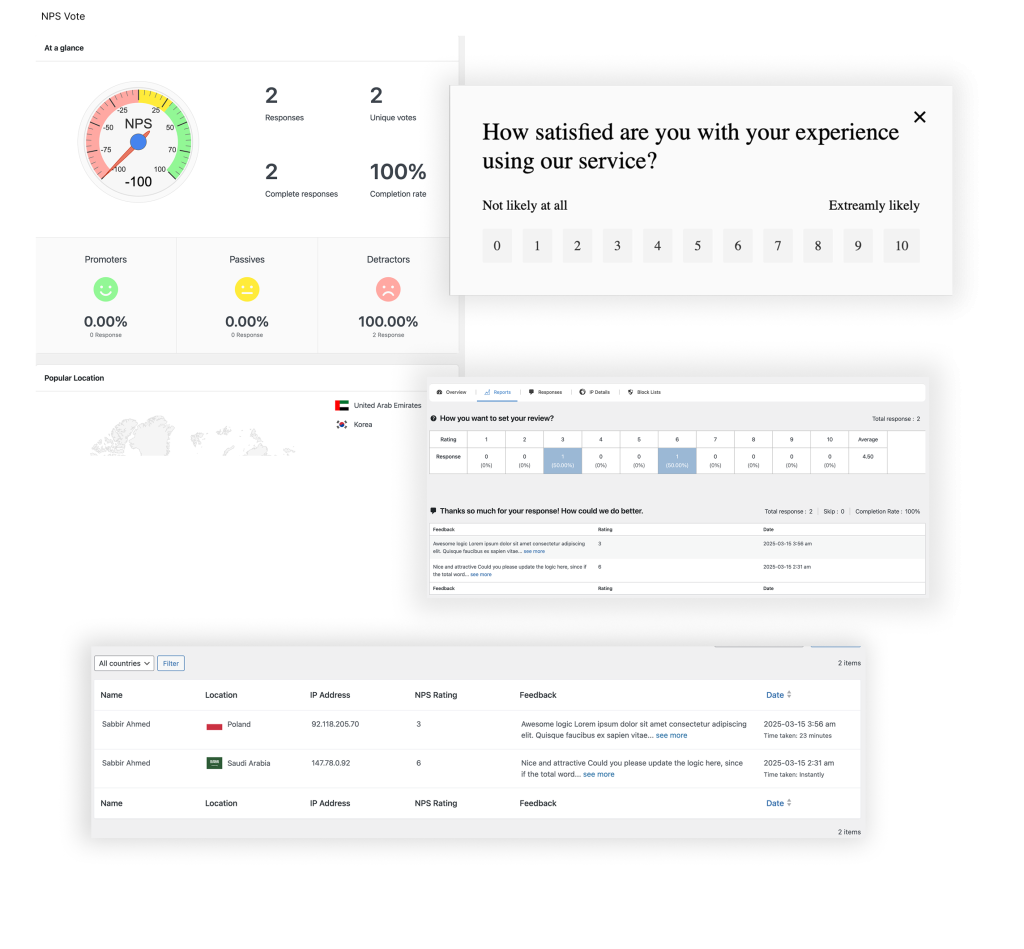
Want to add an NPS (Net Promoter Score) block to your membership site? Need emoji-based reactions to gauge how learners felt after a lesson? Pollify gives you flexible templates you can customize in seconds.
Use cases include:
- 0–10 rating scales for customer loyalty
- Claps, hearts, thumbs up/down for micro-feedback
- Star ratings for product reviews or blog posts
All of these are available as native blocks—no embed scripts, no third-party forms.
Open-Text Polls for Qualitative Feedback
Sometimes, the best insights come from words—not checkboxes.
Pollify Pro includes open-text polls, letting users type responses freely. Whether you’re collecting suggestions, post-course feedback, or story ideas from your community, you can embed these blocks like any other Gutenberg element.
What’s even better? These responses are stored securely in your WordPress database and can be viewed or exported easily.
Vote Limiting & IP Blocking
To ensure data integrity and discourage spam voting, Pollify Pro comes with built-in vote limitation features:
- IP-based restrictions
- Cookie-based tracking
- One-vote-per-user (logged-in only)
This level of control makes Pollify a smart choice for sensitive polls (e.g., internal company decisions, gated content, or contests).
Powerful Export Options (PDF, CSV, Excel, Docs)
Your poll data isn’t just for show—it’s valuable.
Pollify Pro lets you export all vote and feedback data into:
- PDF files for reports
- Excel/CSV for analysis
- Google Docs-like formats for team sharing
This is particularly helpful for educators, marketers, or internal teams who need to share results or track changes over time.
You can also filter responses by poll type, date, or status—saving you time during analysis.
Engagement Block (Featured Polls + Analytics)
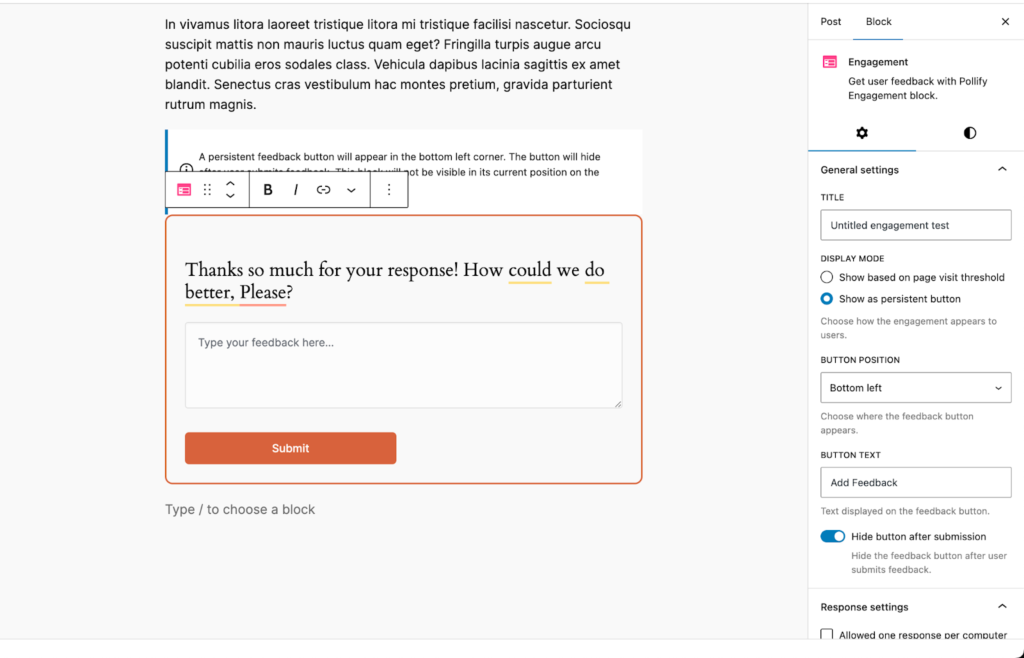
The new Engagement Block lets you highlight selected polls in one place—on the homepage, a sidebar, or even at the end of blog posts.
Use it to showcase:
- Top-voted polls
- Recent polls
- Time-limited voting campaigns
It boosts visibility and encourages continued participation from users who might’ve missed the original post.
Better Frontend Previewing
Pollify Pro improves workflow by adding a quick frontend preview button from all submenus—no more jumping through hoops to see how your poll actually looks live.
This small but thoughtful addition ensures faster editing and easier design decisions.
Developer-Friendly (No Bloat, Clean Code)
Despite being packed with features, Pollify Pro remains lightweight. It’s designed to be developer-friendly and integrates well with most modern block-based themes.
No shortcodes, no jQuery dependencies, and no conflicts with major plugins. If you’re building custom templates or dynamic pages, it just works.
How Pollify Compares to Crowdsignal
Pollify wasn’t just made to compete with Crowdsignal- it was made to exceed it.
Here’s a quick side-by-side of how they stack up:
| Feature | Crowdsignal | Pollify Pro |
|---|---|---|
| Block editor support | Limited (via Jetpack) | Full Gutenberg-native |
| Unlimited polls | No | Yes |
| Emoji reactions | No | Yes |
| NPS polls | No | Yes |
| Open text feedback | No | Yes |
| Export options | CSV only | PDF, Excel, CSV, Docs |
| Price/year | $180 | $79 |
Most importantly, Pollify keeps everything inside your WordPress dashboard. No external dashboard. No Jetpack dependency. No surprise limitations.
How Different Users Are Using Pollify Today
Now Let us check some potential use cases that you should not miss-
Course Creators & Membership Sites
Pollify is a game-changer for online educators. With emoji reactions, star ratings, and NPS feedback, instructors are using it to collect insights after every module or lesson. Open text polls also help gather testimonials and course suggestions on the fly.
Example: Add an NPS poll at the end of a course like “How likely are you to recommend this to others?”
Publishers & Bloggers
From political opinion polls to product reviews, bloggers love how easily Pollify integrates with their editorial workflow. It feels like just another block — no separate dashboards or clunky shortcodes to manage.
Example: Use the horizontal layout block to ask readers which product they’d pick in a comparison post.
eCommerce Sites (WooCommerce)
Online stores are embedding quick polls below product pages to gauge customer interest. Store owners use it to test demand before a product launch or understand satisfaction after purchase.
Example: Use open-ended polls like “What feature do you want next for this product?”
Agencies & Client Projects
Pollify Pro is fast becoming a favorite among WordPress agencies. Its performance-friendly design, exportable results, and native look mean you can integrate feedback tools directly into client builds.
Example: Add vote blocks on landing pages or post-purchase surveys in thank-you pages.
Internal Teams / Private Communities
Because Pollify supports IP blocking, vote limits, and live analytics, it’s perfect for internal use too. Teams use it to quickly gauge interest or get feedback during campaigns or roadmap discussions.
Example: Add a poll in internal intranet sites or password-protected pages.
Get Started with Pollify in Minutes
Whether you’re a blogger, course creator, agency, or store owner- getting started with Pollify is quick and seamless.
Here’s how to launch your first poll in under 2 minutes:
- Install Pollify Free from WordPress.org
Go to your WordPress dashboard → Plugins → Add New → Search for “Pollify”.
Or download it directly from- https://wordpress.org/plugins/poll-creator/ - Create Your First Poll Using the Block Editor
Head to any post or page, click the “+” block inserter, and search for “Pollify.” Choose your poll type- votes, NPS, emojis, open text, or engagement block. - Customize Settings
Adjust labels, colors, layouts, and vote controls to match your branding. Want advanced features? Upgrade to Pro from the same interface. - Publish & Collect Insights Instantly
Your poll is live — users can start voting, sharing, and engaging right away. All results are visible in your WordPress dashboard with easy export options (Pro).
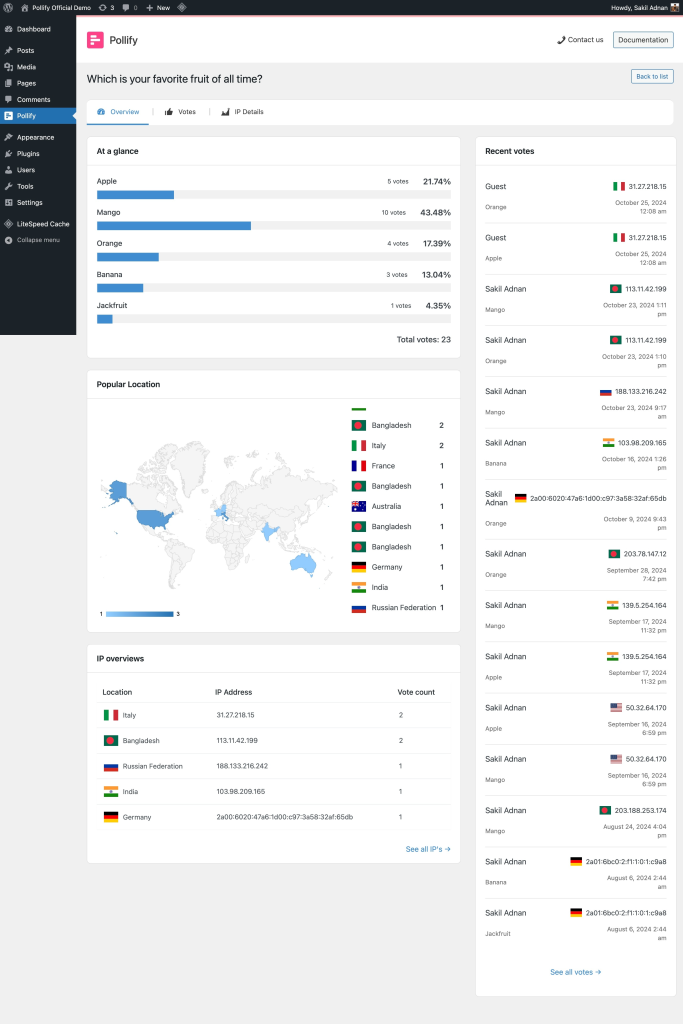
No coding. No clunky shortcodes. Just block-based feedback that works.
Check all tutorials on Pollify lite version and Pollify premium version.
Frequently Asked Questions (FAQs)
1. Can I use Pollify for free?
Yes! Pollify offers a robust free version with unlimited polls, unlimited votes, and full Gutenberg support. It’s available on WordPress Repository.
2. What’s included in the Pro version?
Pollify Pro includes advanced features like NPS polls, emoji feedback, open text responses, export options (PDF, Excel, CSV), vote limits, IP blocking, and the engagement block.
3. Will it work with my theme or page builder?
Pollify is designed for WordPress sites using the Block Editor (Gutenberg). It works with all modern themes that support blocks, including Astra, Kadence, Blocksy, and default WordPress themes.
4. Is Pollify compatible with WooCommerce?
Absolutely. You can add polls inside product descriptions, customer dashboards, or thank-you pages using the Gutenberg editor.
5. Can I export the results and responses?
Yes. Pro users can export poll results in PDF, Excel, CSV, or Docs formats directly from the dashboard.
6. Is there a refund policy?
Yes. We offer a 14-day no-questions-asked money-back guarantee. If Pollify doesn’t meet your needs, just reach out and we’ll refund your payment.
WordPress Poll Plugin: A Native Way to Engage Users Without Friction
Pollify is more than just a WordPress poll maker. It’s your native, block-first engagement layer for any WordPress site that values user insight.
Unlike other plugins, it keeps everything in your workflow. It doesn’t lock features behind steep paywalls, and it doesn’t send your users to external dashboards.
If you value simplicity, flexibility, and performance- Pollify was built for you. The best WordPress poll plugin for your need.
Pollify Early Bird Deal is Now Live!
Pollify Pro is now available at an exclusive 60% Early Bird discount– only for a limited time.
Grab your license now before the Early Bird ends. This deal will never come back.
Let your audience speak. Make your content conversational. Do it the WordPress way- with Pollify.

 Save 90%