
 Click To Copy
 There are four ways to install and activate the Click To Copy Block on your WordPress site.
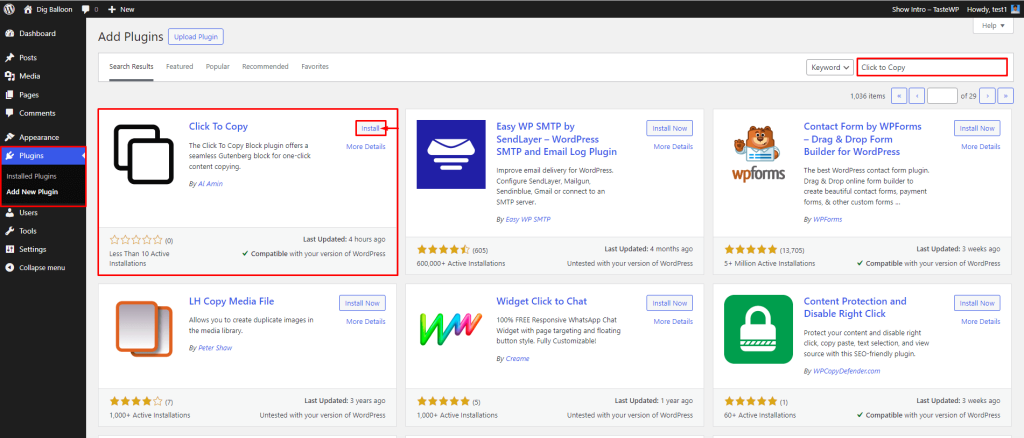
1st way: Install by Search
- Login to your WordPress Admin area
- Click on the Plugin menu on the left side
- Now, go to the right side and search for the “Click To Copy” plugin
- Click on the Install Now button
- Once the plugin is installed, click on the Activate button
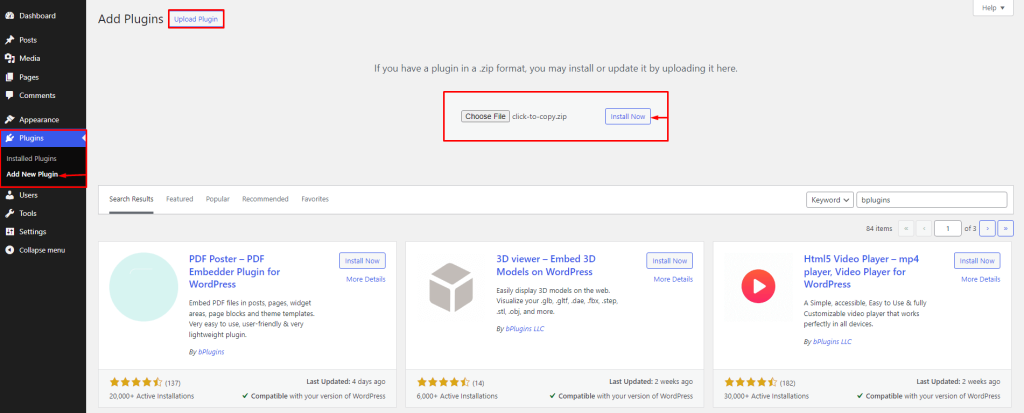
2nd way: Install by Upload
- Download the latest version of the Click to Copy (.zip file).
- Login into your WordPress Admin dashboard.
- Click on the left-side Plugin menu.
- Now at the top of the page, you can see the Add New button, click on that button.
- Again at the top of the page, you can see the Upload Plugin button, click on that button for the following process.
- Click on the Choose File.
- Now upload the zip file(click-to-copy.zip) and click on the Install Now button.
- Activate the plugin.
3rd Way: Install using FTP
- Extract the plugin zip file(click-to-copy.zip). It will create an click-to-copy folder with all files and folders inside it.
- Using your FTP programs like Filezilla or cPanel, upload the non-zipped plugin folder into the /wp-content/plugins/ folder on your server.
- Go to the Dashboard » Plugins » Installed Plugins page and find Click to Copy from the plugins list.
- Click on the Activate button to activate the plugin.
 Save 90%