

Integrating TikTok videos or feeds into your website can add a dynamic and engaging element to your online presence, attracting and captivating visitors with trending content from the popular social media platform.
Whether you’re a blogger, business owner, or simply looking to spice up your website, embedding TikTok content offers a seamless way to connect with your audience and stay current with viral trends.
In this guide, we’ll explore various methods and techniques to effortlessly embed TikTok videos or feeds into any website, enhancing user experience and boosting engagement.
Today we will learn how to embed Tiktok videos into any WordPress site.
Lets start with-
Why Embed TikTok Videos in WordPress?

Our comprehensive blogging statistics reveal that incorporating videos into your posts can boost traffic by an impressive 83% compared to those without video content.
Therefore, if you’re already sharing TikTok content, leveraging these videos on your WordPress site is a logical step.
By embedding TikTok videos onto your website, you can attract more visitors without the need to invest significant time in creating new content.
These videos serve as effective tools for engaging visitors and prolonging their stay on your site, thereby enhancing page views and reducing bounce rates on your WordPress platform.
Moreover, embedding TikTok videos on your website offers dual benefits: not only do they enhance user engagement on your site, but they also serve as promotional tools for your TikTok channel, potentially increasing your follower count and overall engagement on the platform.
Now, let’s delve into the steps for embedding TikTok videos in WordPress. Simply utilize the provided quick links to navigate directly to the method you prefer.
Method 1: Using the B TikTok Feed Plugin
The B TikTok Feed plugin is a simple but useful plugin that will help users embed their TikTok feed on their websites. The plugin is flexible and easy to use so that users can give any desired look to the TikTok widget.
The plugin has all the features that you will need to bring your TikTok profile right onto your website.
Here is how you can use this plugin to add Tiktok feed to your website-
- Go to your Gutenberg Editor.
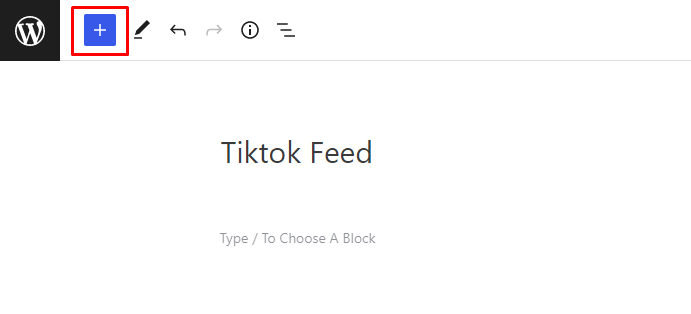
- Click on the Plus button from the top left corner.
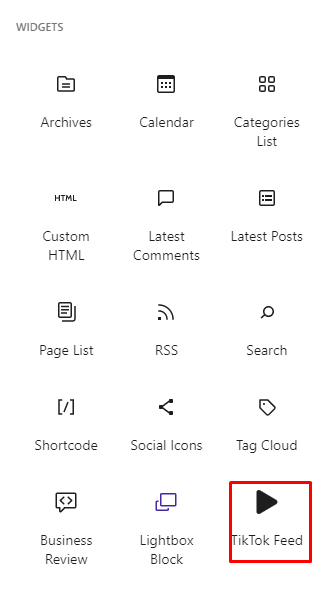
- You can see the TikTok feed block under the Widgets category.
- Click on that block, it will insert the block
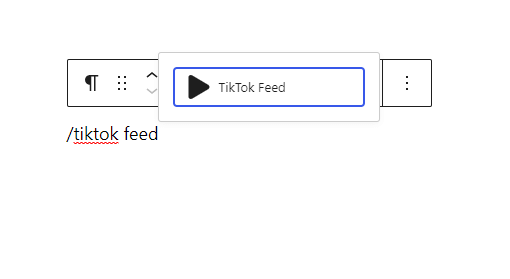
- In your Gutenberg editor, type ‘/‘ and write b tiktok feed.
- Click on that Add Tiktok Account redirect Login with Tiktok Page
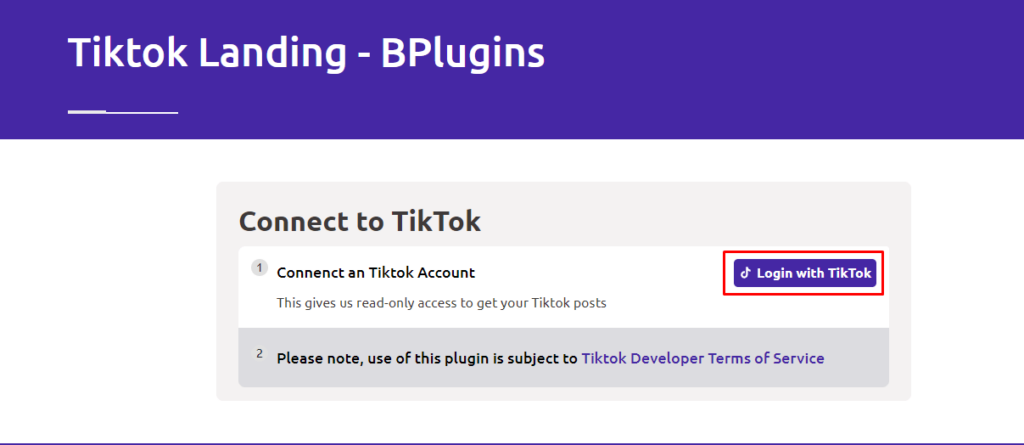
- Next Click Login with Tiktok button redirect Authorization Page
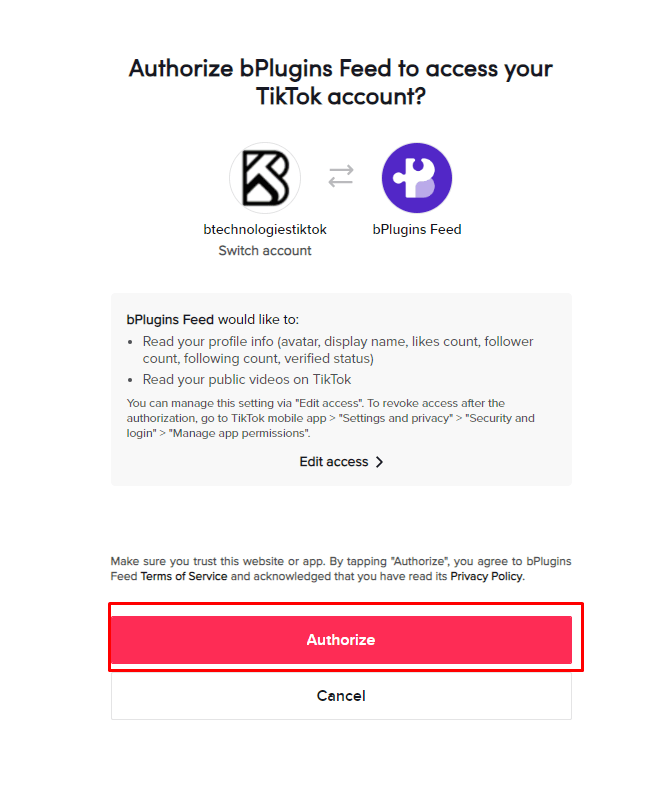
- Click on that Authorize button, it will automatically show your profile and feeds.

This is how you can easily add tiktok feed to your website.
Method 2: Using the TikTok Block
The most straightforward method for embedding TikToks on your WordPress site involves simply pasting the video’s URL into the page or post editor. WordPress will automatically detect the video and fetch it for you.
To get started, visit the TikTok video you wish to embed and copy its URL.
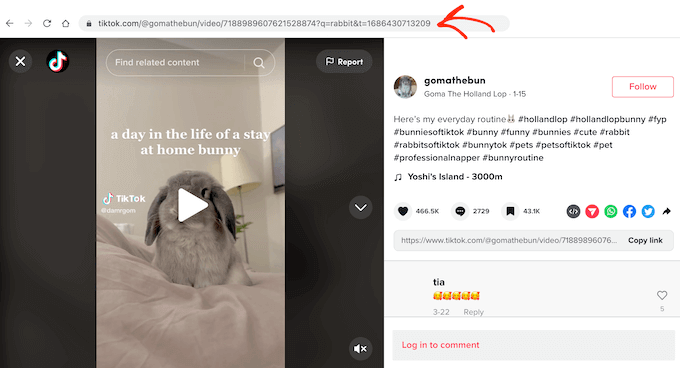
After copying the URL of the desired TikTok video, proceed to the WordPress page or post where you intend to display the video. Within the WordPress block editor, paste the copied URL.
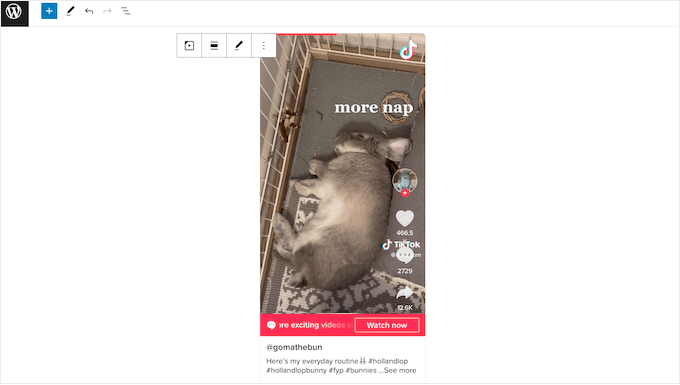
WordPress will promptly recognize the TikTok video URL and automatically incorporate it into a TikTok block, seamlessly embedding the video into your content.
Alternatively, you can achieve similar results by adding the TikTok block to a page or post. This method allows you to add the TikTok video’s URL at any point, which can be particularly useful if you’re unsure about which TikTok video to embed or if the video hasn’t been published yet. It’s also a helpful approach for planning your layout, especially when designing a landing page or sales page.
To add a TikTok block, simply click on the ‘+’ icon within the WordPress editor and then type in ‘TikTok.’ This straightforward process streamlines the integration of TikTok content into your WordPress site.
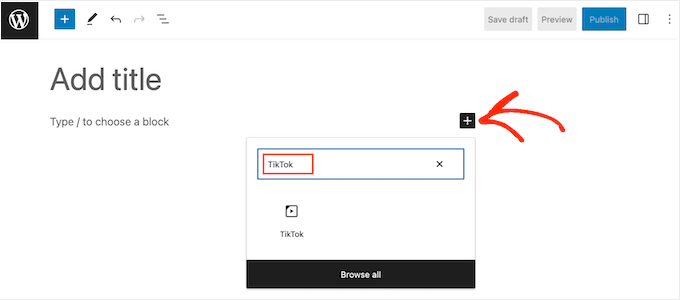
Once the TikTok block appears in the block options, click to add it to your page or post.
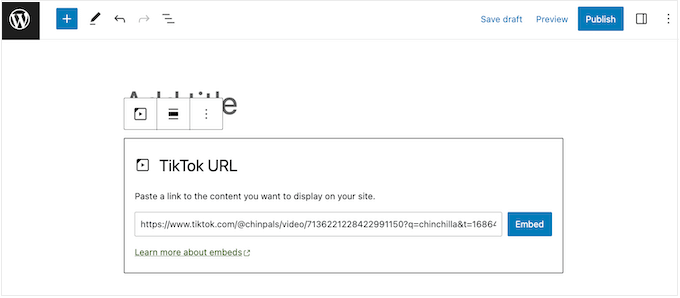
After adding the block, paste the TikTok URL directly into the block, then click on ‘Embed’ to finalize the embedding process. This action seamlessly integrates the TikTok video into your WordPress content.
An alternative approach is to embed the TikTok video within a widget-ready area, such as the sidebar or a similar section, enabling you to display the same video across your entire site. For instance, if you’re promoting a viral giveaway on TikTok, embedding the video announcing the contest in a widget-ready area can effectively spread the message.
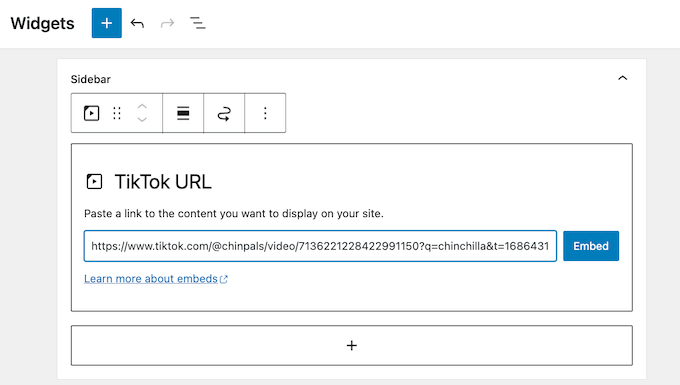
To accomplish this, navigate to “Appearance” » “Widgets” in your WordPress dashboard. Here, you’ll find various sections where you can add widgets throughout your WordPress site.
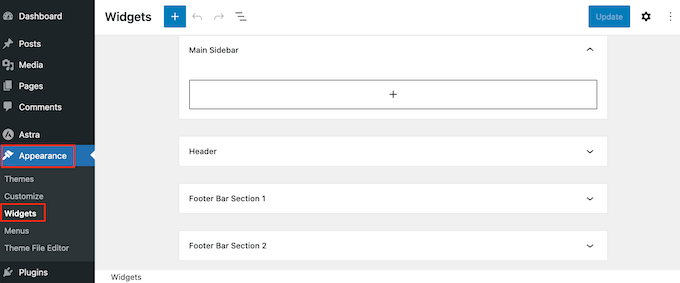
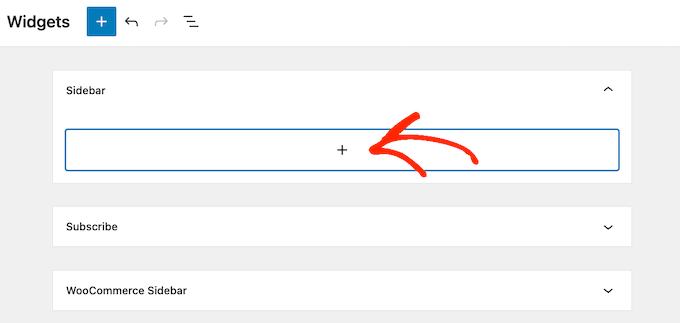
Once you’ve located the desired area where you wish to embed the TikTok video, proceed by clicking on the ‘+’ icon. This action will prompt you to select the widget you want to add to the specified area.
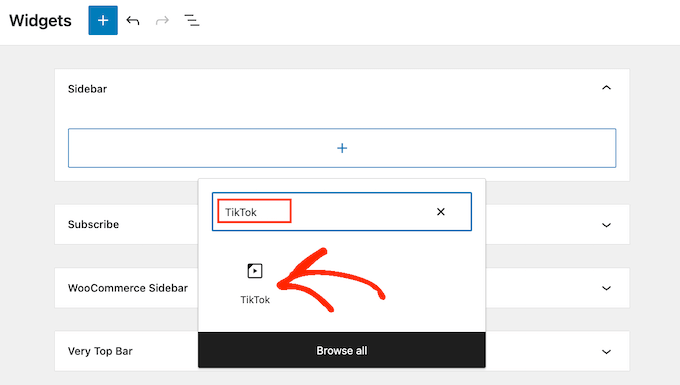
In the popup window that appears, type ‘TikTok’ into the search bar.
Once the TikTok block appears in the search results, click on it to add it to the widget-ready area where you want to embed the TikTok video.
Now, you can paste the URL of the TikTok video that you wish to embed into the designated field within the TikTok block.
After pasting the URL, click on the ‘Embed’ button to complete the embedding process. This action will integrate the TikTok video seamlessly into the widget-ready area of your WordPress site.
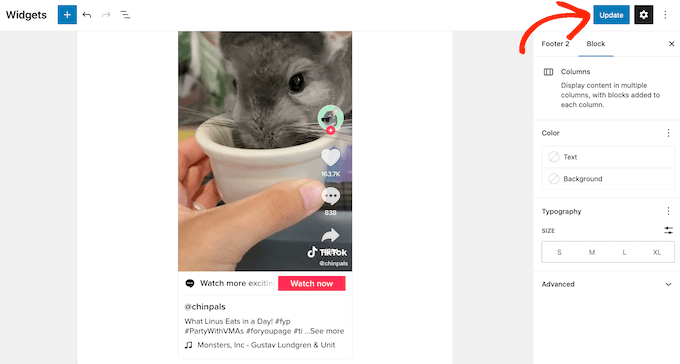
Once you have completed embedding the TikTok video and made any necessary adjustments, be sure to click on the ‘Update’ button to apply the changes and make them live on your WordPress site.
After updating, you can visit your WordPress blog or website to view the embedded TikTok video in action. This ensures that your audience can engage with the TikTok content directly from your site.
Method 3. Using Gutenberg Full-Site Editor
If you’re utilizing a block theme, you have the flexibility to add TikTok videos to any widget-ready area or template using the full-site editor. This feature enables you to display TikTok content on pages and posts that may not be editable using the standard content editor. For instance, you could enhance your 404 page template with TikTok videos to improve user engagement.
To access the full-site editor in your WordPress dashboard, navigate to “Themes” » “Editor.” This option allows you to make advanced customizations to your theme, including adding TikTok content to various sections of your website.
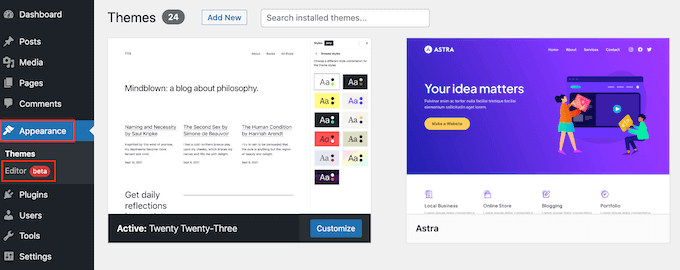
By default, the full-site editor will show your theme’s home template.
To embed a TikTok video, locate the specific template where you intend to add it and click on it. For example, let’s say we want to add a TikTok video to the Archive page template. However, the steps will be quite similar regardless of which template you’re working with.
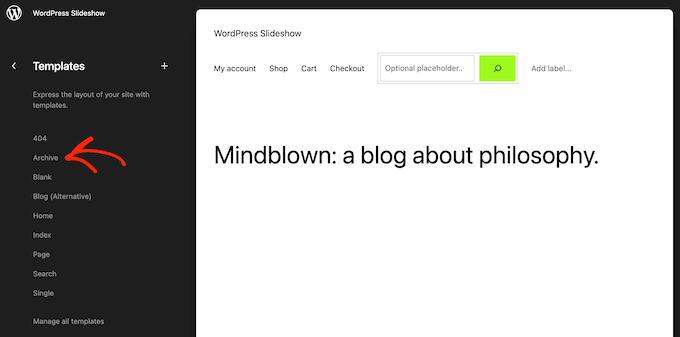
WordPress will now show a preview of the template.
To go ahead and edit the layout, click on the small pencil icon.
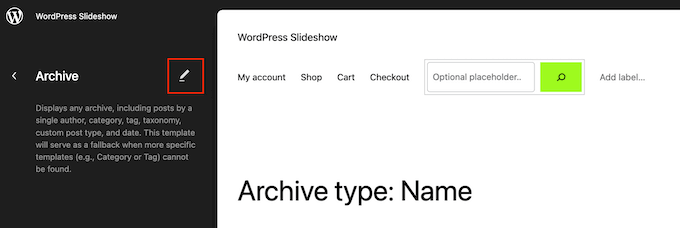
With that done, click on the ‘+’ button towards the top left of the screen.
In the search bar that appears, type in ‘TikTok.’
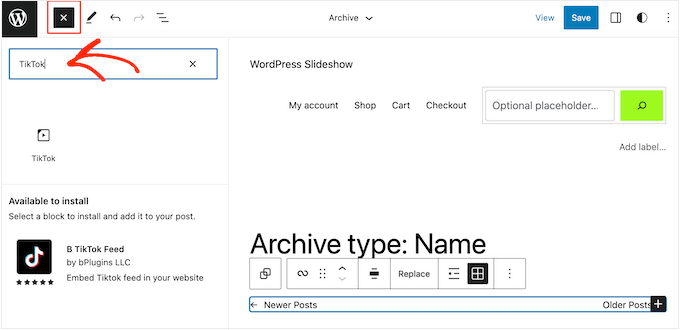
You can now paste the video’s URL into the TikTok block, and click on the ‘Embed’ button.
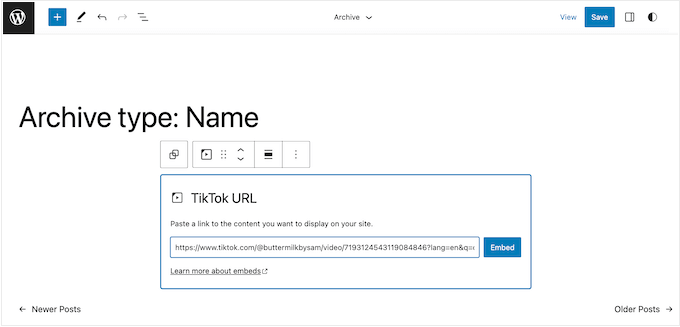
When you’re happy with how the template looks, click on the ‘Save’ button. Now, simply visit your WordPress website to see the TikTok in action.
Conclusion
Embedding TikTok videos or feeds into your website is a fantastic way to leverage the popularity and viral nature of TikTok content to enhance your online presence.
By adding TikTok content, you can capture the attention of your audience, keep them engaged, and stay relevant in today’s fast-paced digital landscape.
Whether you’re showcasing your own TikTok videos, curating trending content, or promoting user-generated content, integrating TikTok into your website can elevate your brand, drive traffic, and foster deeper connections with your visitors.

 Save 90%