
In today’s fast-paced eCommerce world, product visuals play a critical role in influencing purchase decisions. Shoppers aren’t satisfied with static images anymore—they expect rich, interactive experiences that let them fully explore what they’re buying.
That’s where 360° product views and real-time 3D models come in, offering a dynamic way to showcase products from every angle.
These immersive tools let customers rotate, zoom, and explore your products from every angle, helping them feel confident in their purchase. The result? Fewer returns, longer time on site, and higher conversion rates.
In this guide, we’ll walk you through the key benefits of interactive product visualization, compare the best WordPress plugins available, and show you exactly how to embed and optimize 3D product displays on your site.
We’ll also share expert tips on performance, mobile responsiveness, and accessibility—everything you need to deliver a seamless 3D experience to your customers.
If you’re ready to boost your WooCommerce store with immersive product views, keep reading.
Benefits of 3D Product Views
Integrating 3D product views into your WordPress eCommerce store offers significant advantages that can enhance customer experience and drive business growth.
Here’s how:
1. Boosts Customer Confidence Through Better Visualization
Static product images often fail to provide a complete picture, especially for items that require inspection from multiple angles.
With 3D viewers, customers can rotate, zoom, and interact with the product, replicating an in-store experience. This level of detail builds trust, leading to fewer doubts and more confident purchasing decisions.
Studies show that 63% of shoppers prefer interactive views before buying, and stores implementing 3D visualization have reported conversion rate increases of up to 40%. (Source: PureWeb)
2. Increases Time-on-Site and User Engagement
Interactive elements like 3D models naturally increase user engagement. When customers can explore a product in real time, they spend more time on the page, clicking, zooming, and rotating.
This deeper engagement not only improves the shopping experience but also contributes to SEO performance by lowering bounce rates and increasing average session duration.
3. Reduces Product Returns
Returns are a costly challenge for eCommerce businesses. Many returns stem from customer expectations not matching the actual product. 360° product views help minimize this risk by providing a true-to-life representation.
This leads to fewer surprises post-purchase, reducing the likelihood of dissatisfaction and product returns.
4. Competitive Edge in Crowded Markets
In a saturated market, every advantage counts. Offering 3D visuals sets your store apart from competitors still relying on static images. It signals innovation, professionalism, and transparency.
Customers are more likely to trust and purchase from a store that goes the extra mile to showcase its products effectively.
5. Increases Mobile and AR Shopping Experience
Many modern 3D viewers are compatible with AR (Augmented Reality), especially on mobile devices. This enables users to see how a product would look in their environment, from furniture to wearables.
Mobile-first and AR-capable visualization boosts confidence and appeals to tech-savvy shoppers, especially important as mobile eCommerce continues to rise.
Top WordPress Plugins for 360° Product View
When it comes to showcasing products in 360° or interactive 3D on a WordPress site, not all plugins are created equal. The top plugins balance ease of use, file compatibility, WooCommerce integration, and performance optimization.
Whether you’re looking for basic model viewers or full-featured WooCommerce product display tools, the following 360° product view plugins offer strong solutions for modern online stores.
3D Viewer
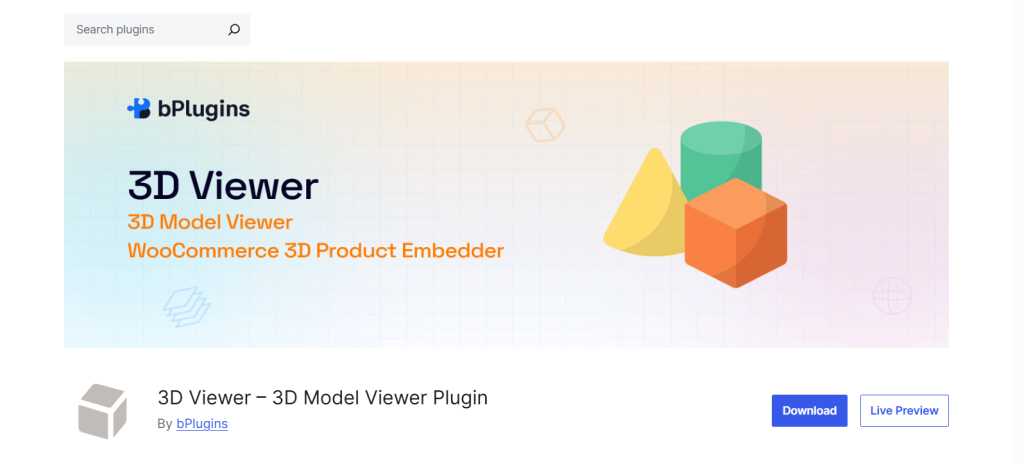
3D Viewer is a powerful, user-friendly plugin designed specifically for WordPress users who want to embed interactive 3D models without touching code. Whether you’re a designer, developer, or eCommerce merchant, this plugin makes it incredibly easy to showcase products using real-time 3D views.
Key Features:
- Drag-and-drop upload of GLB, GLTF, OBJ, and STL files
- Embed anywhere: Use Gutenberg blocks, shortcodes, widgets, or WooCommerce product pages
- WooCommerce-ready: Add one or multiple 3D models to product pages as a gallery
- Elementor support: Seamless integration with Elementor builder (Pro version)
- Auto-rotation and zoom: Add dynamic product interactions with customizable controls
- Touch and mobile-friendly: Optimized for smartphones, tablets, and touch gestures
- Performance optimized: Lightweight single-library architecture, lazy loading, and CDN compatibility
- External file support: Load 3D models from external sources or your media library
- Shortcode Generator: Easily create and customize embeds with intuitive settings
- Advanced Pro features: Shadow control, poster image preloading, fullscreen toggle, and more
Best For: Store owners, designers, or developers looking for a complete, no-fuss 3D solution for WordPress and WooCommerce. If you want reliability, customization, and performance in one plugin, 3D Viewer is the way to go.
Easy 3D Viewer
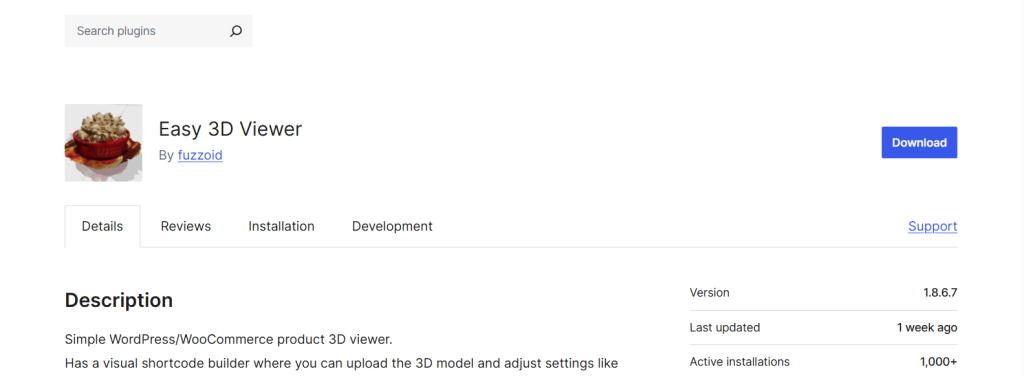
Easy 3D Viewer is a basic but effective plugin ideal for portfolios, product mockups, or websites that only need to display a few 3D models without advanced eCommerce features.
Key Features:
- Simple UI with minimal configuration
- Supports OBJ and STL formats
- Lightweight and clean for fast loading
- Suitable for developers or artists showcasing product designs
Best For: Freelancers, small studios, or creatives who need an easy way to display models without WooCommerce or complex embedding tools.
3D Viewer by Visody
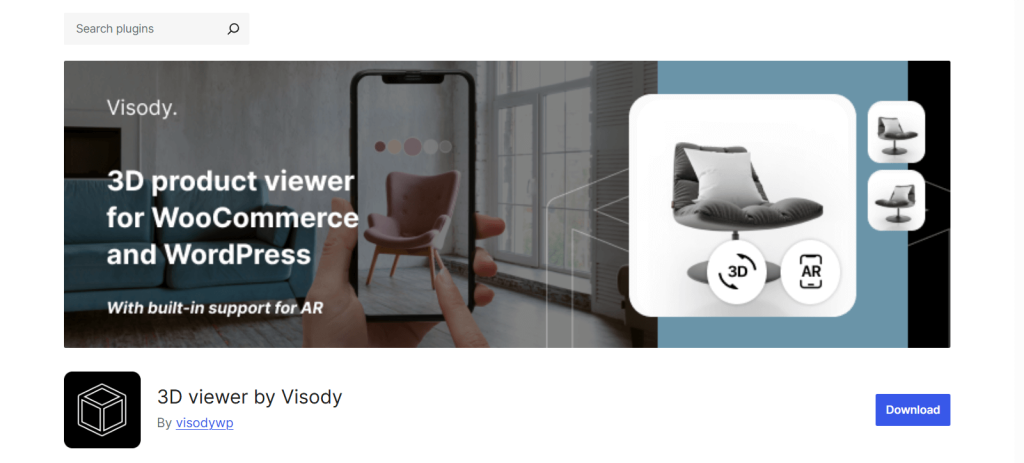
3D Viewer by Visody is built for high-end product displays and supports advanced 3D rendering and augmented reality (AR) features. It’s best suited for luxury products or complex configurations.
Key Features:
- Advanced AR support (compatible with WebXR, USDZ, and ARCore)
- WooCommerce integration with interactive model hotspots and animations
- Detailed camera and lighting controls
- Designed for showroom-level presentations
Best For: High-end brands or tech-forward stores that want to provide immersive AR experiences and rich 3D interactions directly in their product pages.
Here’s a clean and informative Comparative Analysis Table for the top 3D/360° product view plugins:
| Features | 3D Viewer | Easy 3D Viewer | 3D Viewer by Visody |
|---|---|---|---|
| Ease of Use | ⭐⭐⭐⭐⭐ Very | ⭐⭐ Basic | ⭐⭐⭐ Advanced |
| File Format Support | GLB, GLTF, OBJ, STL | OBJ, STL | GLTF, USDZ (AR), others |
| WooCommerce Integration | Yes, with gallery support | No | Yes, with AR + hotspots |
| Gutenberg / Shortcode Support | Both | Shortcode only | Both |
| Elementor Support | Supported | Not supported | Not supported |
| AR Compatibility | WebGL only | No | Full WebXR/AR support |
| Touch/Mobile Friendly | Yes | Basic gestures | Yes, with AR gestures |
| Performance & Lazy Loading | Optimized + Lazy Load | Lightweight by design | Depends on model complexity |
| Support & Updates | Active support + documentation | Limited | Priority support available |
Every plugin has its strengths depending on your needs. If you’re building a WooCommerce store and want complete 3D functionality with zero hassle, the 3D Viewer Plugin offers the best balance of power, ease, and performance.
For simpler needs, Easy 3D Viewer might suffice. And if you’re targeting luxury buyers or using AR, Visody could be worth the investment.
Learn how to embed 3D images in WooCommerce
How to Embed 3D Models Using 3D Viewer Plugin
Adding interactive 3D models into your WordPress site is easier than you might think, especially with the 3D Viewer Plugin.
Designed with simplicity in mind, this plugin lets you embed stunning, real-time 3D content directly into your posts, pages, and WooCommerce product listings without writing a single line of code.
In this section, we’ll walk you through the step-by-step process to upload your 3D models, configure viewer settings, and place them exactly where your customers will see them.
Installation and Activation
Navigate to your WordPress dashboard. Go to Plugins → Add New and search for the 3D Viewer plugin. Now, install and activate the plugin.
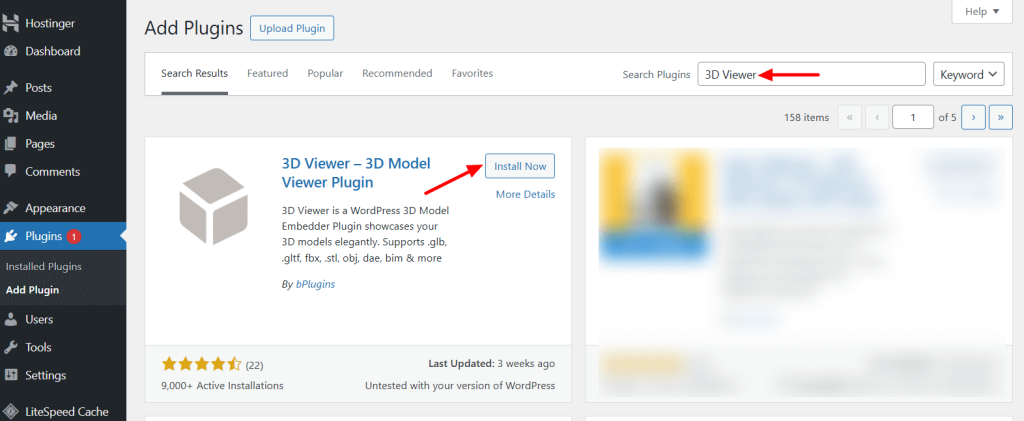
Note: If you’ve installed the pro version, you need the license key to activate the plugin.
Add a 3D Model
Go to 3D Viewer → Add New area. Write the name of your model title and utilize the settings to customize the viewer and model type.
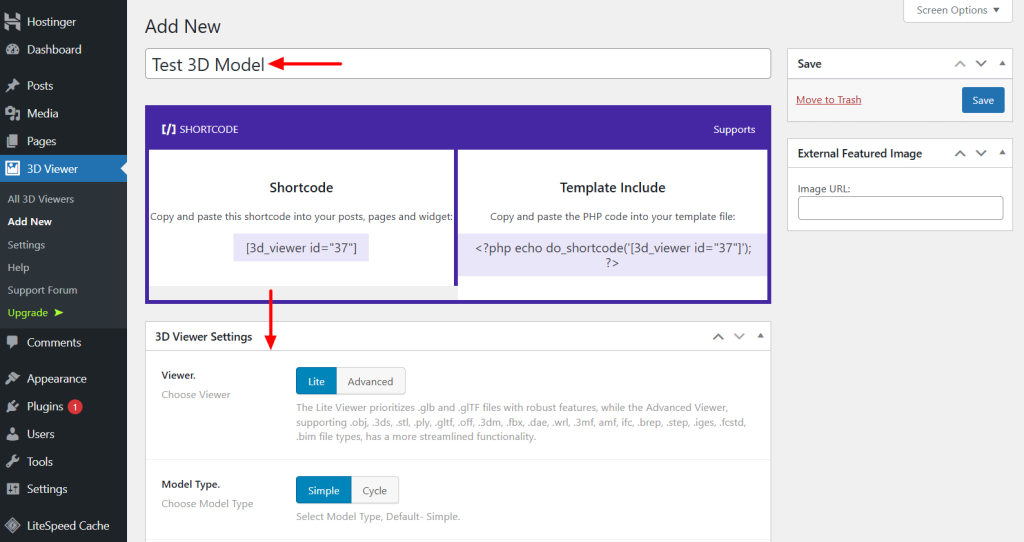
Scroll down a bit, and you’ll find the upload options. You can either upload a 3D model file directly or enter the URL of a hosted model to embed it.
After uploading, you’ll be able to customize various settings such as the viewer’s width and height, background color, interaction controls, zoom functionality, and loading behavior—all to match your site’s design and user experience.
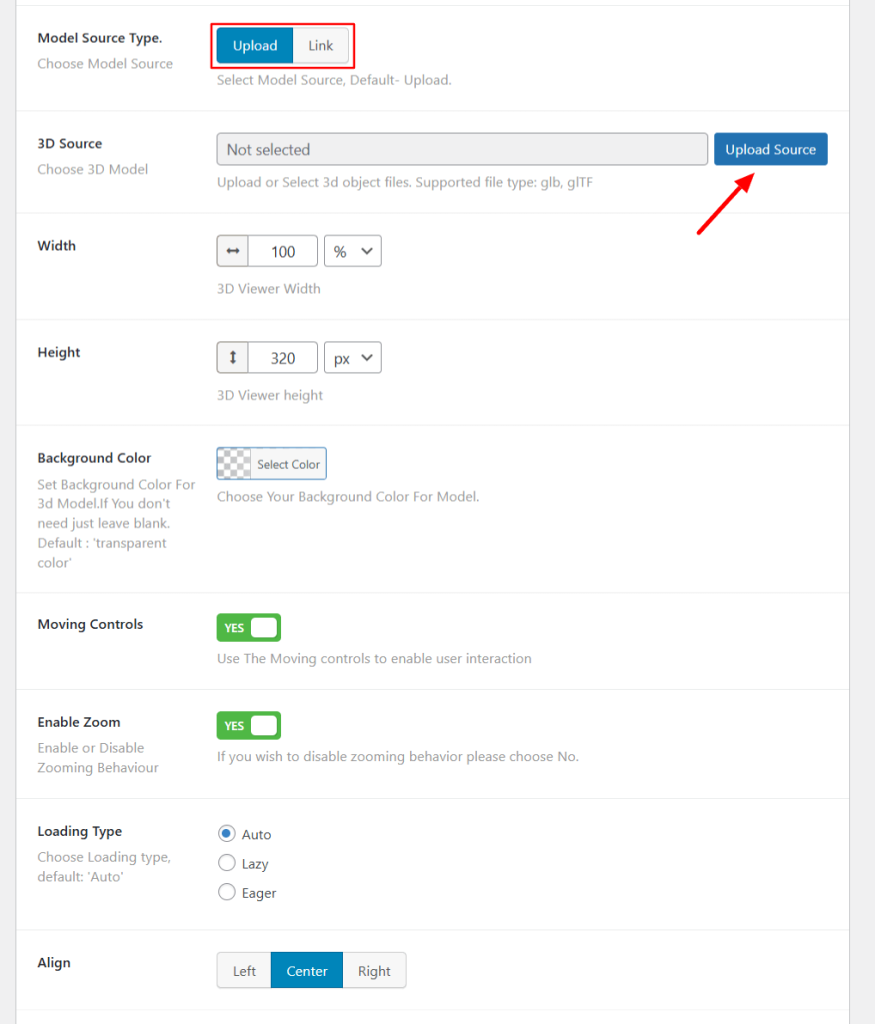
After configuring the settings, click the save button, and copy the shortcode.
Add a 3D Model Using the Shortcode and Gutenberg Block
Open the page or post to the block editor where you want to add the 3D model. Add the Shortcode block and paste the copied shortcode, and press the publish button.
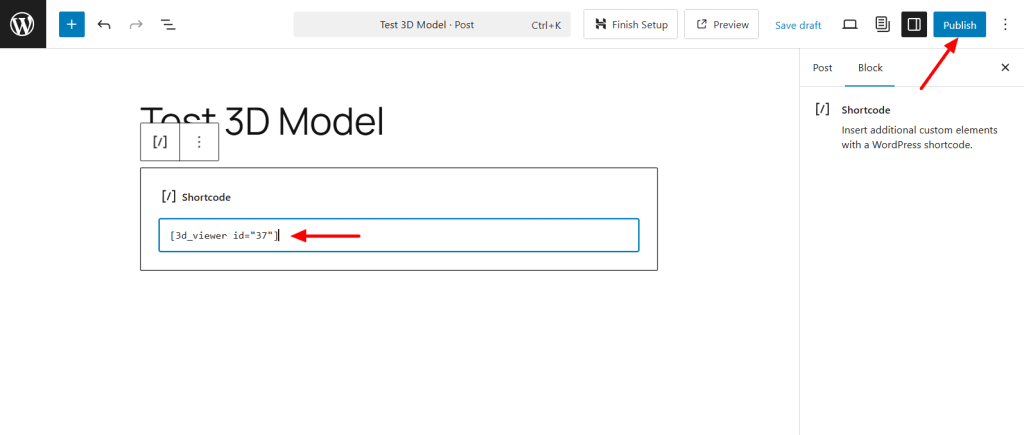
Open the post or page in the WordPress editor panel. Click the “+” icon to open the block library and look for the 3D Viewer block.
Add the block to the suitable area.
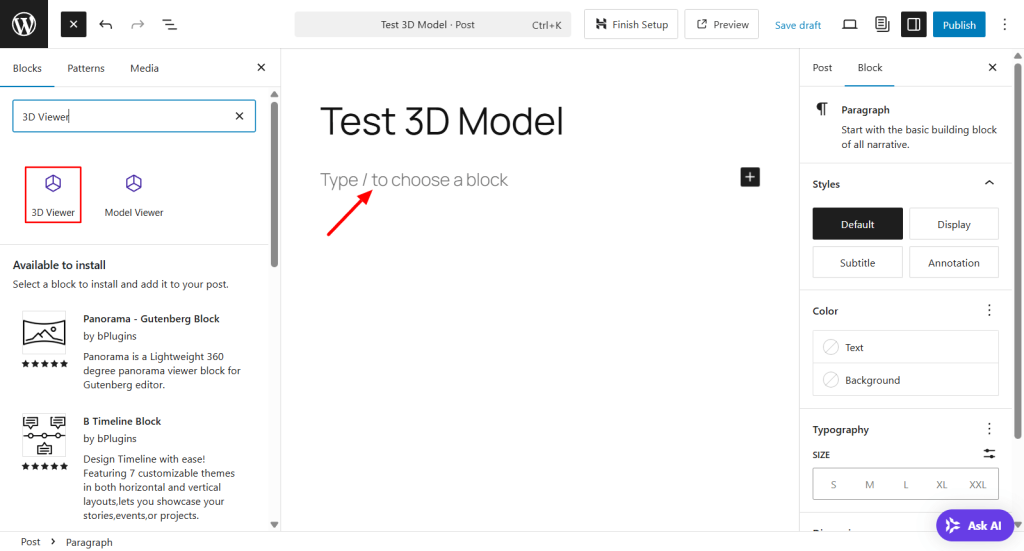
Use the block sidebar settings panel to upload your 3D model.
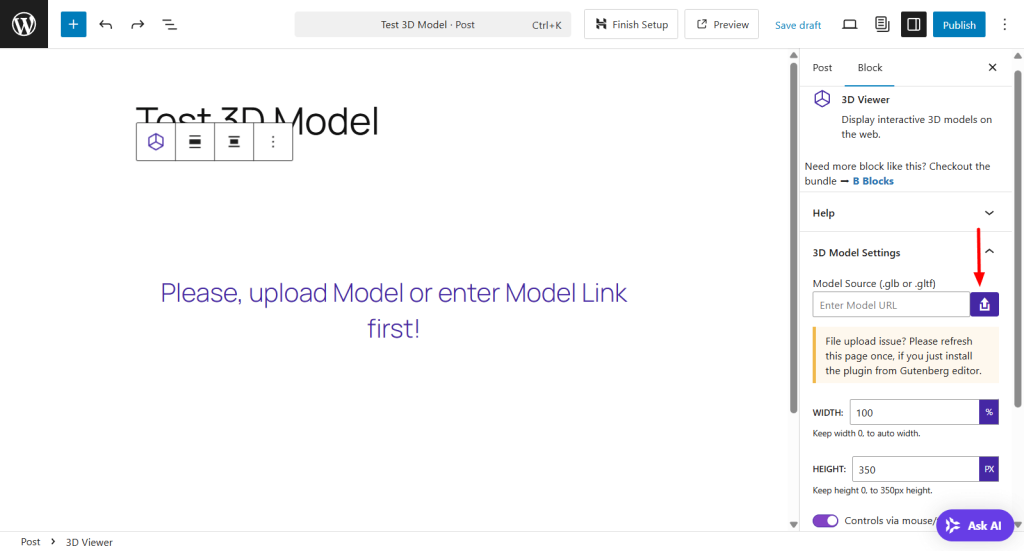
Once done, play with the settings to customize your model and hit the publish button.
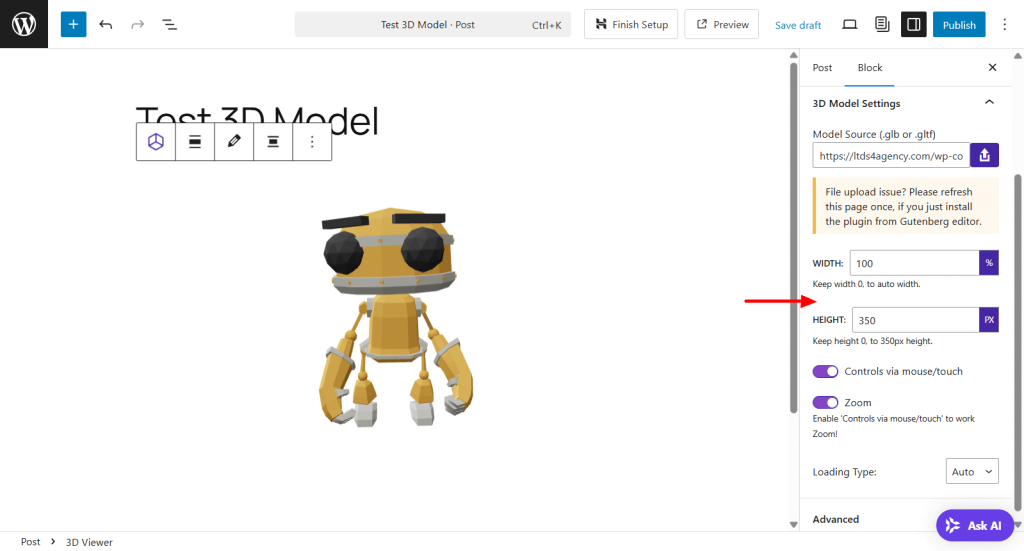
Here is the final result of the 3D model.
Add a 3D Model to Your WooCommerce Product
You can easily add a 3D model to any new or existing product. Simply go to Products > Add New or choose an existing product to edit.
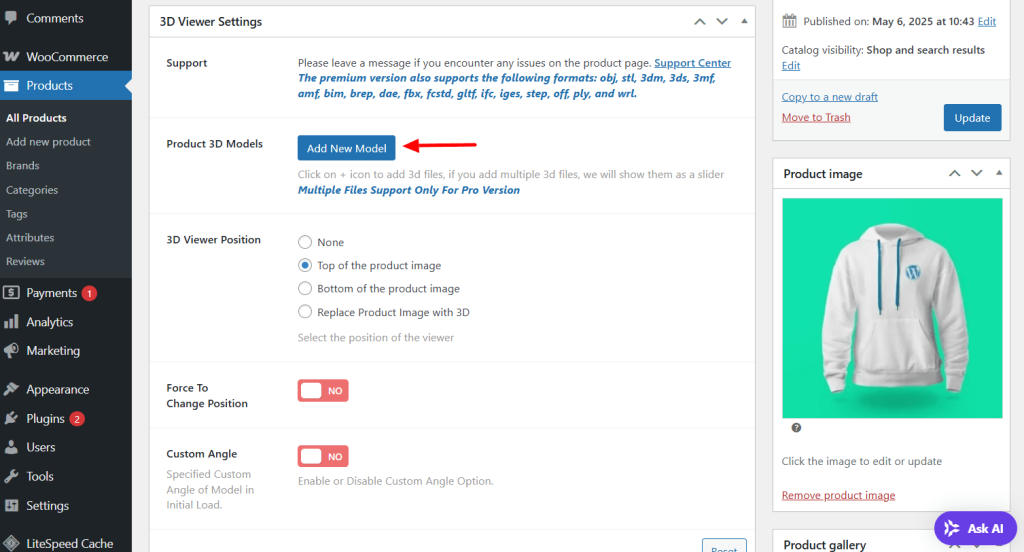
In the product editor, you’ll see a new section labeled 3D Viewer Settings. This is where you can upload your product’s 3D model and customize the display settings to match your preferences.
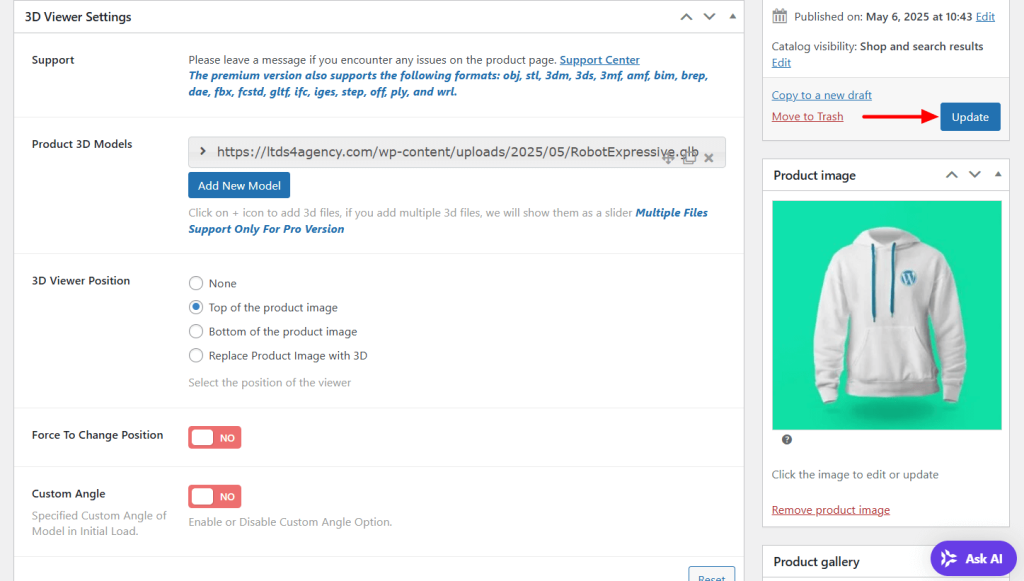
Note: If you have the pro version of 3D Viewer, you can add multiple 3D models of your products.
Best Practices for 3D Product Implementation
Implementing 3D product views can greatly enhance user experience—but only when done right. Poor execution can lead to slow load times, inconsistent behavior across devices, or even lost sales.
Here are the essential best practices to follow for successful integration in your WordPress site:
1. Optimize Model File Size and Use a CDN
3D models (GLB, GLTF, OBJ, etc.) can be large, especially when detailed. Large files impact page speed, which directly affects SEO and user experience.
To maintain performance:
- Compress models before uploading using tools like glTF-Pipeline or Draco compression.
- Limit polygon count and texture resolution where possible.
- Use lazy loading or load models only when they enter the viewport.
- Serve model files through a Content Delivery Network (CDN) such as Cloudflare, BunnyCDN, or Amazon CloudFront for faster global delivery.
Fast-loading 3D content retains users and keeps your Core Web Vitals healthy.
2. Ensure Mobile and AR Responsiveness
A growing number of users shop via smartphones and tablets, so your 3D viewers must be mobile-optimized.
Best practices include:
- Responsive layout: Use a plugin that automatically scales the 3D canvas for different screen sizes.
- Touch gesture support: Pinch, zoom, and drag interactions should work fluidly on mobile.
- AR compatibility: Choose plugins that support WebXR or export models compatible with Apple’s USDZ and Android’s ARCore.
- Always test across iOS and Android to ensure models render correctly.
Responsive 3D design improves reach and offers immersive shopping experiences across all devices.
3. Prioritize Accessibility and User Experience (UX)
Interactive 3D features should enhance, not hinder, the buying journey.
A few key tips:
- Keyboard navigation and ARIA labels: Ensure your 3D viewer supports assistive technologies.
- Provide fallback images for browsers that don’t support WebGL or for users with slower devices.
- Include clear instructions or icons for rotating and zooming.
- Avoid auto-playing animations that may overwhelm or distract users.
- Use high-contrast controls and keep interfaces intuitive.
By focusing on accessibility, you can ensure your store is usable by a broader audience, including those with disabilities.
4. Test Across Browsers, Devices, and WooCommerce Integration
3D experiences can behave differently depending on the browser or device.
To guarantee reliability:
- Test models in Chrome, Firefox, Safari, and Edge on both desktop and mobile.
- Check loading speeds on various internet connections.
- Ensure proper alignment with WooCommerce product galleries—your 3D viewer should not conflict with other product images or variation selections.
- Use staging environments to test updates and plugin compatibility before deploying.
Regular testing ensures a consistent experience for every shopper and prevents technical hiccups that could hurt sales.
Bonus Tip: Use Analytics to Monitor Interaction
Want to know if users are engaging with your 3D views? Track it. Many advanced 3D viewer plugins allow event tracking (e.g., clicks, rotations, zooms) through Google Analytics or Tag Manager.
This helps you:
- Understand user behavior.
- Identify product pages with high engagement.
- Optimize pages where interaction is low.
By following these best practices, you’ll ensure your 3D product implementation is not only beautiful and functional but also fast, accessible, and user-friendly—ultimately increasing conversions and customer satisfaction.
Conclusion
Integrating 3D product views into your WordPress store is more than a design upgrade—it’s a strategic move to boost engagement, reduce returns, and stay competitive in a visually driven market.
Here’s a quick recap of the top plugin options:
- 3D Viewer Plugin: Best for store owners seeking a full-featured, WooCommerce-ready solution with easy 3D upload and Gutenberg support.
- Easy 3D Viewer: Great for lightweight needs like portfolios or simple model displays.
- 3D Viewer by Visody: Ideal for high-end showcases with AR support, animations, and advanced product hotspots.
If you’re unsure where to start, the 3D Viewer Plugin is a great entry point. It combines ease of use with powerful features, making it ideal for anyone looking to add immersive 3D content without sacrificing performance.
Ready to give your customers a next-level shopping experience?
👉Explore the live demo, test the free version, and upgrade to Pro to unlock advanced capabilities that help your store stand out and sell more.

 Save 90%