

Video is one of the most powerful ways to connect with your audience, whether you’re running a blog, an online store, or a learning platform.
WordPress makes it easy to embed videos, but the default video player is quite limited, offering minimal customization, branding, and control features.
That’s where dedicated video player plugins come in. With the right plugin, you can enhance your site’s user experience, better protect your content, and customize the video player to match your brand and goals.
In this guide, we’ll explore why a custom video player matters and compare three of the best WordPress video player plugins, including the highly flexible and feature-rich HTML5 Video Player Plugin.
Let’s dive in.
Why You Need a Custom Video Player for WordPress
While WordPress’s native video player offers basic functionality, it often falls short for users seeking advanced features and greater control over their video content.
1. Limited Customization Options
The native player lacks flexibility in design and functionality. You can’t easily change its appearance to match your site’s branding or add enhancements like chapter markers, playback speed controls, or call-to-action buttons.
2. No Playlist Support
If you want to showcase a series of videos, such as tutorials, course modules, or product walkthroughs, the default player offers no built-in playlist functionality.
This forces you to add videos manually and separately, which can disrupt the user journey.
3. No Download Protection
Videos embedded using the default player can be easily downloaded using browser tools.
If you’re offering premium or gated video content, this lack of protection can lead to unauthorized sharing or content theft.
4. Performance and Hosting Limitations
Uploading large videos directly to your WordPress media library can slow down your site, consume server resources, and negatively impact page load times, especially on mobile devices.
A more advanced video player plugin can help by supporting external hosting and optimized playback.
5. Incompatibility with Advanced Use Cases
Whether you’re running a membership site, an online course platform, or a digital product business, the built-in player simply doesn’t scale.
You need features like role-based access, dynamic embedding, analytics tracking, or schema markup for SEO, none of which are supported out of the box.
6. Poor Branding and Engagement
The generic look of the default player doesn’t inspire trust or engagement. A custom video player allows you to create a seamless, branded experience that keeps users focused on your content, not distracted by inconsistent design.
For creators, educators, marketers, and businesses that rely on video, upgrading to a custom video player plugin is more than just a visual improvement, it’s a step toward delivering faster, safer, and more engaging content on your WordPress site.
3 Best HTML5 Video Player Plugins for WordPress (With Quick Comparison)
Choosing the right HTML5 video player plugin can dramatically impact how your content is delivered, consumed, and protected. Whether you’re focused on user experience, branding, or safeguarding premium videos, the right tool makes all the difference.
Below are three of the most popular and capable options available today, compared by their strengths, ideal use cases, and limitations.
HTML5 Video Player
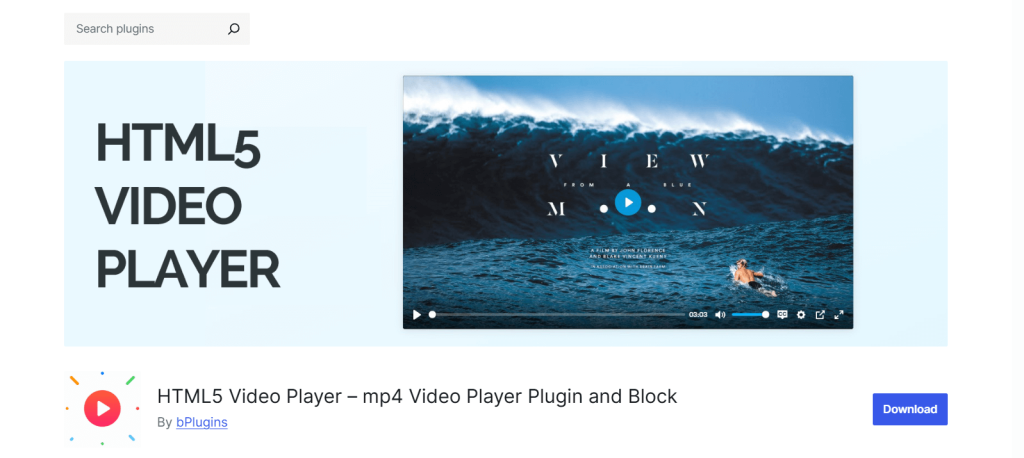
If you’re looking for a no-code, lightweight, and fully customizable video player for WordPress, the HTML5 Video Player plugin is hands-down one of the best options available. Trusted by over 30,000 websites, it offers a powerful yet intuitive experience for creators, educators, marketers, and online sellers.
Unlike the default WordPress video player, which is quite limited, this plugin gives you full control over how your videos look, feel, and function — without writing a single line of code.
Why It’s the Best Choice
- Total Customization Without Coding: Change player skins, colors, and control layouts to match your site’s branding effortlessly. Use built-in shortcodes or a Gutenberg block to embed videos anywhere.
- Responsive & Mobile Friendly: Your videos will look perfect across all screen sizes — from desktop to tablets and smartphones — without additional plugins or tweaks.
- Advanced Playback Features: Supports autoplay, loop, mute, custom start time, preload settings, and even popup or sticky playback to improve user engagement.
- Playlist Support: Showcase collections of videos, such as courses, demos, or testimonials, with playlist layouts and navigation.
- Video Protection: Built-in features like download button toggles, password protection, and watermark support help safeguard your premium or gated content.
If you want the perfect balance of flexibility, protection, and ease of use, the HTML5 Video Player plugin covers it all, especially with the Pro version unlocking advanced controls, analytics, and security.
Check out the HTML5 Video Player plugin review.
Presto Player
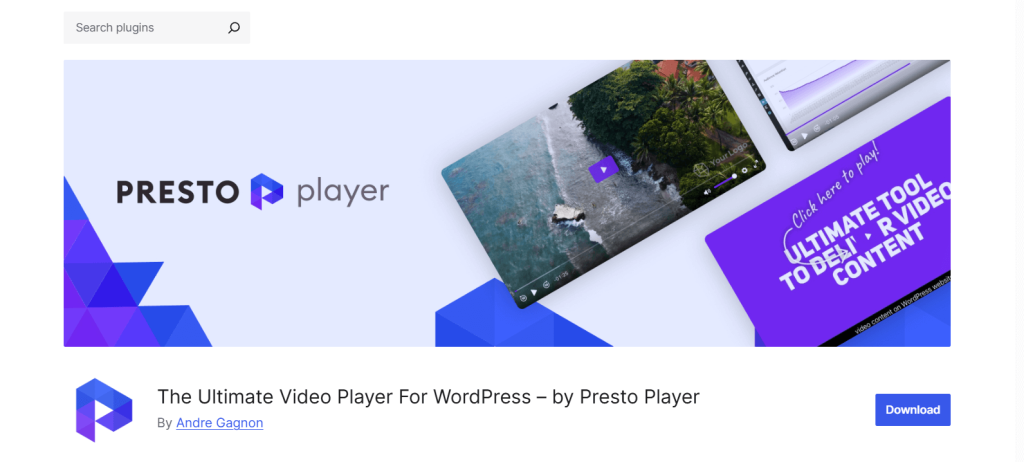
Presto Player is a premium-focused video player built with course creators, digital marketers, and membership site owners in mind.
It’s especially popular in the LMS (Learning Management System) space for its robust features like video chapters, email capture overlays, and deep integrations with page builders and marketing platforms.
Why It’s a Good Choice
- Engagement Tools: Add call-to-action buttons, email opt-ins, and timed chapters to keep users interacting.
- Private Video Hosting Support: Seamless integration with Bunny.net and Vimeo Pro makes it easy to securely stream protected content.
- Player Branding: Customize the look and feel to match your brand with presets and design tools.
- Analytics & LMS Integration: Works with LearnDash, Tutor LMS, and more, making it great for educational content.
Things to Consider
- Heavier on Performance: It’s more resource-intensive than simpler players, especially if you’re not using caching or CDNs effectively.
- Not Ideal for Basic Needs: If you just want a clean, customizable player without advanced integrations, this may be overkill.
Easy Video Player
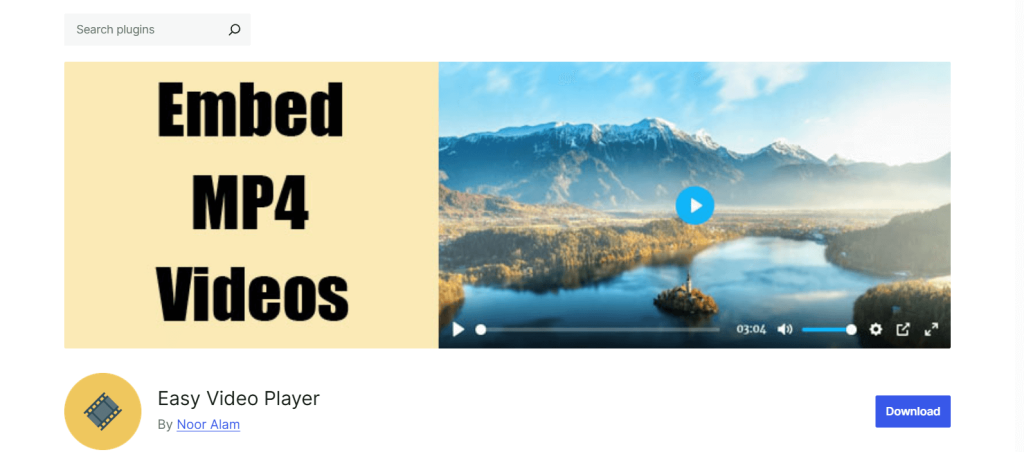
Easy Video Player is exactly what its name suggests — a lightweight, beginner-friendly plugin that lets you embed self-hosted videos with minimal setup.
It’s perfect for users who just want a simple player without any distractions.
Why It’s a Good Choice
- Straightforward Setup: Quickly embed MP4 files using shortcodes or the block editor.
- Responsive Design: Works well on desktops, tablets, and mobile devices without extra configuration.
- Basic Customization: Offers some layout and control toggles without overwhelming users.
Things to Consider
- Limited Customization: No deep branding tools or layout control — what you see is mostly what you get.
- No Built-in Video Protection: There are no options to disable downloads or restrict access, which might be a dealbreaker for creators selling premium content.
- Lacks Advanced Features: No playlist support, quality switching, analytics, or schema markup.
Here’s a quick comparison of the best WordPress video player plugins.
| Features | HTML5 Video Player | Presto Player | Easy Video Player |
|---|---|---|---|
| Free Version Available | Yes, fully functional | Limited (Mostly Paid) | Yes |
| Ease of Use | Beginner-Friendly | Learning Curve | Beginner-Friendly |
| Playlist Support | Included (Pro) | Basic in Pro | Not Supported |
| Video Protection (Disable Downloads) | Yes (Pro) | Yes (via Bunny Pro) | Not Available |
| Responsive Design | Fully Responsive | Fully Responsive | Fully Responsive |
| Customization Options | Skins, Colors, CSS, Controls | Advanced Design Tools | Minimal |
| External Video Hosting | S3, Vimeo, etc. (Pro) | Bunny (Paid) | Limited |
| Schema Markup (SEO) | Built-in | Not Natively Supported | Not Included |
| Page Builder Compatibility | Gutenberg, Elementor, More | Strong Integration | Basic |
| Video Analytics / Tracking | Built-in | Yes | Not Available |
How to Customize the HTML5 Video Player in WordPress (Step-by-Step Guide)
Customizing your video player doesn’t have to be complicated. With the HTML5 Video Player Plugin, you get a user-friendly interface, powerful settings, and no need for coding.
Whether you’re updating the colors, adding subtitles, or enabling autoplay only when visible, this guide will walk you through the most important customization options, step by step.
Here’s how you can do it:
Installation and Activation
Navigate to your WordPress dashboard. Go to Plugins → Add New and search for HTML5 Video Player. Now, install and activate the plugin.
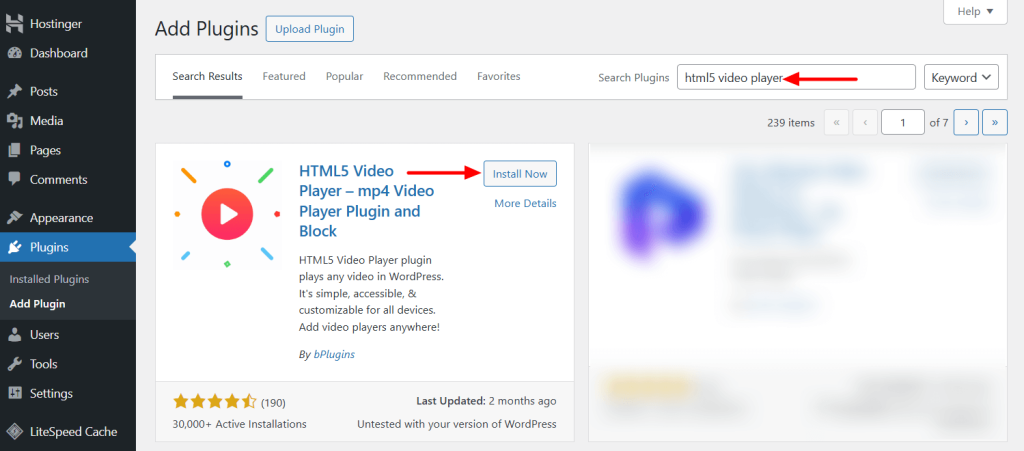
Note: If you’ve installed the pro version, you need the license key to activate the plugin.
Add Your First Video
Adding a video to your post or page is very easy. You can use the dedicated Gutenberg Block named HTML5 Video Player.
Let’s try it.
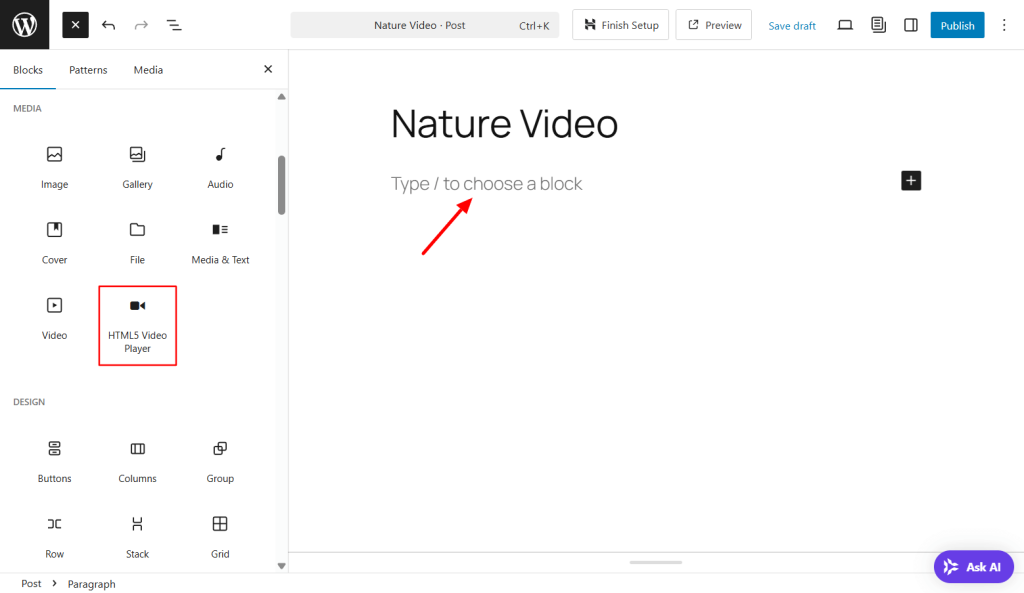
Open the page or post in the WordPress editor panel. Click the “+” icon to open the block library and look for the HTML5 Video Player block under the media category.
Add the block to the suitable area.
Now, you can use the media uploader to upload your video.
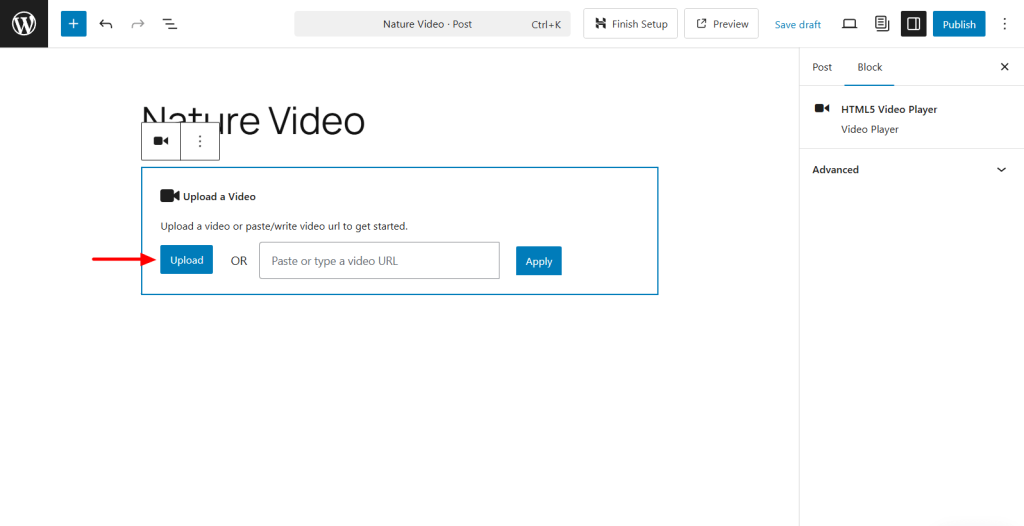
Note: If you purchase the pro version, you can add video from YouTube and Vimeo.
Once you add the video, you will see all the settings on the right sidebar panel.
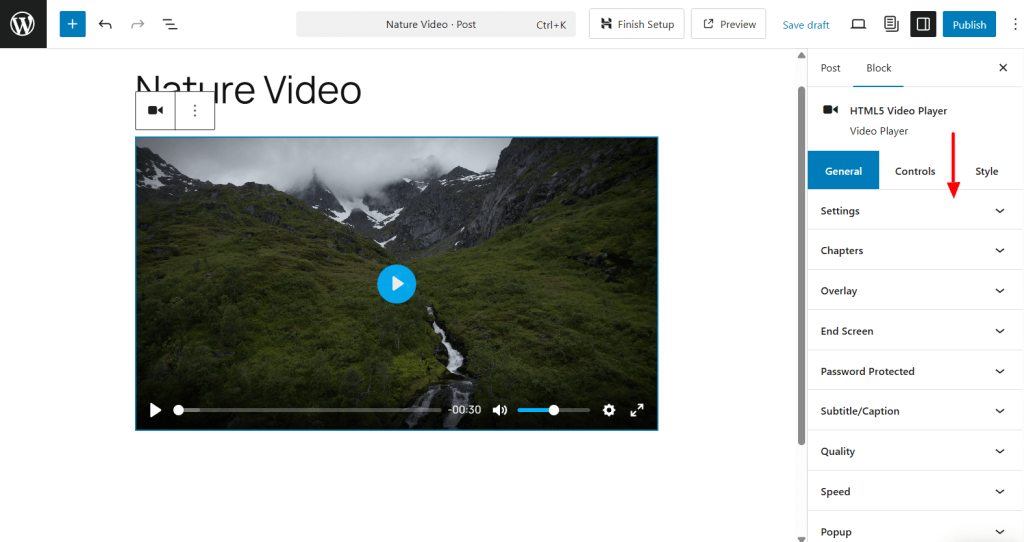
- Chapters: Add markers for easy navigation through long videos.
- Overlay: Display a custom image or text over the video.
- End Screen: Show a CTA or image after the video finishes.
- Password Protected: Restrict access to viewers with a password.
- Subtitle/Caption: Add captions or multilingual subtitles for accessibility.
- Quality: Allow viewers to change resolution (e.g., 480p, 720p).
- Speed: Let users adjust playback speed (e.g., 1.5x, 2x).
- Popup: Open videos in a distraction-free modal window.
- Watermark: Add your logo or brand as a visible watermark.
- Additional (CSS Class/ID): Apply custom CSS classes or IDs for styling or scripting.
Under the player settings, you have all the options to customize your video. You can do a lot with the settings.
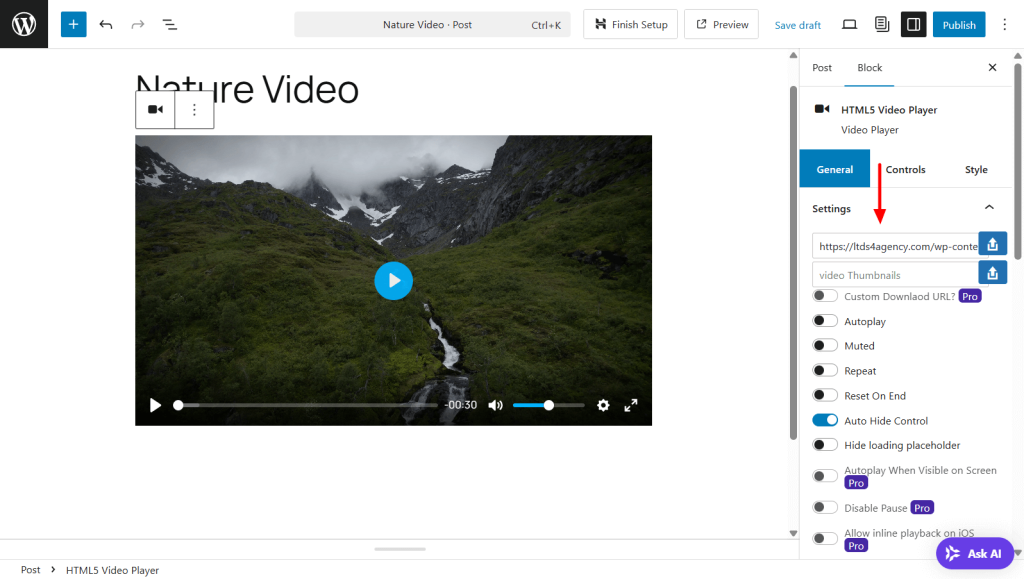
The following are some:
- Video Thumbnails: Display a preview image before playback starts.
- Custom Download URL: Redirect the “Download” button to a custom link.
- Autoplay: Automatically play the video when the page loads.
- Muted: Start the video with no sound (required for autoplay in most browsers).
- Repeat: Loop the video continuously.
- Reset On End: Rewind the video to the beginning after it finishes.
- Auto Hide Control: Hide playback controls after a few seconds of inactivity.
- Hide Loading Placeholder: Remove default loading graphics for a cleaner appearance.
- Autoplay When Visible on Screen: Only autoplay when video scrolls into view.
- Disable Pause: Prevent viewers from pausing the video.
- Allow Inline Playback on iOS: Let videos play inline on iPhones/iPads (not full screen).
The HTML5 Video Player has a complete control panel for managing your video. Play with the following controller settings to enhance your customer video player experience.
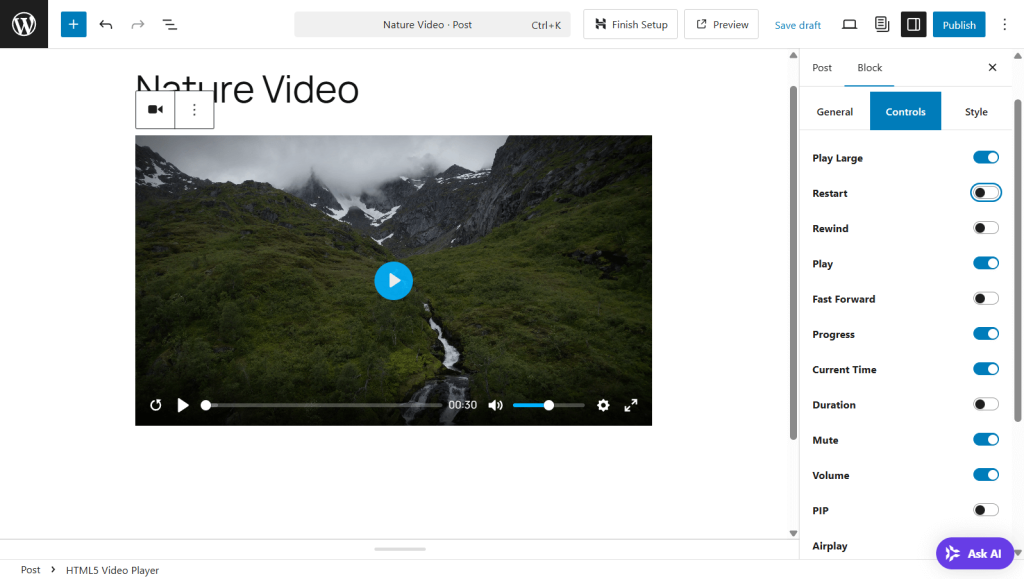
- Play Large: Displays a large central play button before the video starts for better UX.
- Restart: Restarts the video from the beginning with one click.
- Rewind: Skips backward by a set time (e.g., 10 seconds).
- Play: Toggles between playing and pausing the video.
- Fast Forward: Skips forward by a set interval (e.g., 10 seconds).
- Progress: Shows the playback progress bar to track how much of the video has played.
- Current Time: Displays the current playback time during viewing.
- Duration: Shows the total length of the video.
- Mute: Toggles sound on/off instantly.
- Volume: Provides a slider to control the video’s audio level.
- PIP (Picture-in-Picture): Lets users pop out the video into a floating window while browsing.
- Airplay: Enables video streaming to AirPlay-compatible devices like Apple TV.
- Captions: Toggle subtitle/caption tracks for accessibility or translation.
- Settings: Opens a settings menu (for options like quality and speed).
- Download: Allows users to download the video file, if enabled.
- Fullscreen: Expands the video to full screen for immersive viewing.
Go to the style tab to manage the width and round corners of your player. After that, hit the publish button to save the changes.
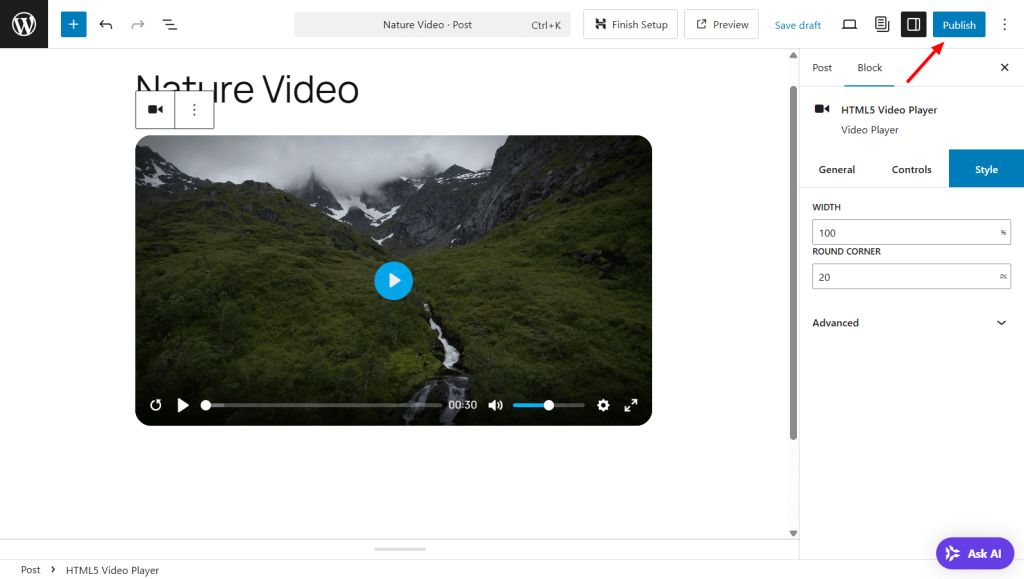
That’s it.
Advanced Features and Customization
With the HTML5 Video Player Pro, you unlock a powerful suite of features designed to give you total control over how your videos look, behave, and engage your audience.
Here are some of the most impactful premium features and how they can transform your video experience on WordPress.
Color Picker for Seamless Branding
Your website has a unique visual identity—your video player should reflect that too. With the built-in Color Picker, you can customize every part of the player’s appearance, from the control bar to play buttons, ensuring it blends perfectly with your brand colors. No coding needed.
This not only improves aesthetics but also builds brand consistency and trust across your site.
👉 Ideal for marketers, agencies, and eCommerce brands who want every visual detail to feel intentional.
External Hosting Support (Amazon S3, Bunny.net, etc.)
Large video files can slow down your site if hosted directly on your server. That’s where External Hosting Support comes in. With HTML5 Video Player Pro, you can easily embed videos hosted on platforms like Amazon S3, Bunny.net, or any remote server.
It keeps your site fast and efficient while giving you full control over video delivery.
👉 Perfect for high-traffic sites, course creators, or anyone managing large media libraries.
Multiple Subtitles for Accessibility & Global Reach
Adding subtitles isn’t just about accessibility—it’s also about reaching a broader audience. With Multiple Subtitles Support, you can upload several subtitle tracks (e.g., English, Spanish, French) so viewers can select their preferred language.
It improves user experience, supports SEO through video captions, and makes your content more inclusive.
👉 A must-have for educators, international brands, and anyone serious about accessibility.
Quality Switcher for Viewer-Controlled Playback
Not all users have the same internet speed or device capabilities. The Quality Switcher allows viewers to toggle between different video resolutions, similar to YouTube, so they can choose the best quality for their connection.
This minimizes buffering and frustration, keeping users engaged longer.
👉 Especially useful for mobile users and international visitors with varying bandwidth limits.
Password-Protected Videos for Private Content
Want to restrict access to specific videos? With Password Protection, you can lock individual videos and share access only with people who have the password.
This is essential for premium courses, internal training, client previews, or membership-only content.
👉 Great for coaches, instructors, or businesses offering gated video material.
Sticky on Scroll for Persistent Engagement
Ever wish your video stayed visible while users scrolled through your page? The Sticky on Scroll feature makes this possible. As your users scroll, the video player sticks to a corner of the screen, continuing playback without interruption.
It’s perfect for tutorials, product demos, or sales videos where you want users to stay engaged while reading content.
👉 Ideal for long-form landing pages, blog tutorials, or any content where retention matters.
FAQs: Your WordPress Video Player Plugin
Can I use external video URLs (like Amazon S3 or Vimeo) with an HTML5 video player plugin?
Yes! The HTML5 Video Player Pro supports embedding videos from external sources like Amazon S3, Vimeo, and other remote servers.
This lets you offload heavy video files from your hosting server while delivering high-quality playback directly on your WordPress site. It’s perfect for high-volume content creators and those looking to reduce server strain.
Will the video player slow down my website?
Not at all. The plugin is lightweight and performance-optimized, even when used with high-quality video files.
With the Page Load Optimizer (Pro feature), you can control how and when videos preload—choosing between “auto,” “metadata,” or “none”—to keep your pages fast, especially on mobile devices.
Does the plugin support autoplay or loop features?
Yes. You can enable autoplay, loop, mute, and even autoplay only when visible on screen (Pro).
This smart autoplay feature prevents videos from playing off-screen, which improves UX and conserves bandwidth. You have full control over how and when your videos play.
Can I add captions or subtitles to my videos?
Absolutely. Multiple subtitle tracks are supported in the Pro version, allowing you to upload and display captions in different languages.
This enhances accessibility for hearing-impaired users and helps reach international audiences.
Is the video player compatible with all WordPress themes and page builders (like Elementor)?
Yes, the plugin works seamlessly with all major themes and page builders, including Elementor, Gutenberg, Divi, WPBakery, and more.
It also includes a dedicated Gutenberg block and shortcode generator, so adding videos is easy, no matter how your site is built.
Can I customize the player’s appearance using CSS?
Yes! Both the free and pro versions support custom CSS styling.
For even more control, the Pro version lets you assign a unique CSS class or ID to each player, so developers and designers can create pixel-perfect customizations to match brand guidelines or advanced layouts.
How can I track how many times a video has been watched?
While the core plugin doesn’t include built-in analytics, it supports integration with third-party video tracking tools via custom attributes and event hooks.
Developers can extend the plugin to capture view counts or trigger JavaScript events, making it compatible with services like Google Analytics, Plausible, or custom reporting dashboards.
Can I restrict video access to logged-in users only?
Yes. The Pro version includes Password Protection, and with a little integration using WordPress membership or LMS plugins, you can limit playback to logged-in users.
This makes it ideal for course creators, coaches, and membership-based content delivery.
Does the plugin support schema markup for videos?
Yes. HTML5 Video Player is SEO-optimized and includes schema.org markup, helping search engines better understand and index your video content.
This can improve click-through rates by enabling rich snippets in Google search results.
Can I load videos dynamically (e.g., via AJAX or JavaScript)?
Yes, developers can dynamically insert player shortcodes using JavaScript or AJAX calls.
Combined with the plugin’s lightweight core, this makes it a great fit for performance-focused applications like infinite scrolling, dynamic post loading, or single-page apps.
Conclusion
A great video player does more than just play media—it enhances your brand, improves user experience, and protects your valuable content.
With a custom video player plugin, you get the flexibility to match your site’s style, organize videos into playlists, and even prevent unwanted downloads.
Among the top options available, the HTML5 Video Player plugin stands out for its ease of use, responsive design, and powerful pro features, making it ideal for creators, educators, marketers, and business owners alike.
Get started with the HTML5 Video Player plugin today and take full control of your WordPress video experience.

 Save 90%